Build your support automation yourself
The same requests come in every day, order status, returns, invoices. Now they run on their own instead of by hand. You build the workflows yourself with drag-and-drop, and the AI Co-Pilot builds right alongside you.

































The same requests eat up your whole day
Around 40% of all support requests in e-commerce are about the same handful of topics. Without automation, every single one lands on your team by hand.
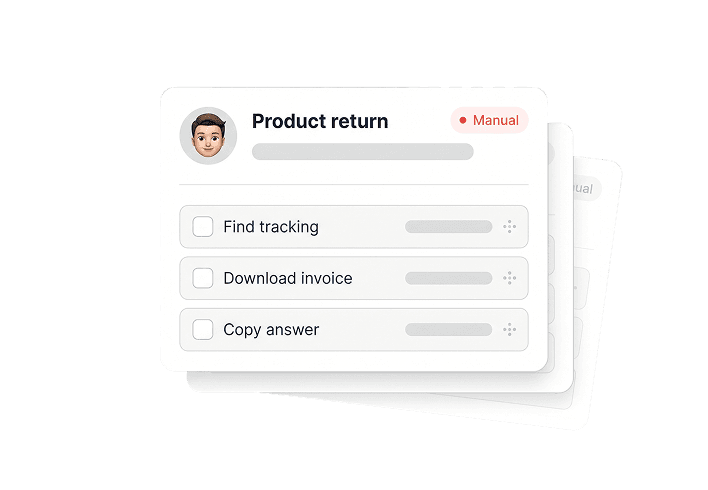
Copy-paste all day long
For every request, your team jumps between Shopify, your ERP, and the carrier, then messages each customer one by one. As one shop put it: "Someone always has to filter Shopify and message everyone manually."
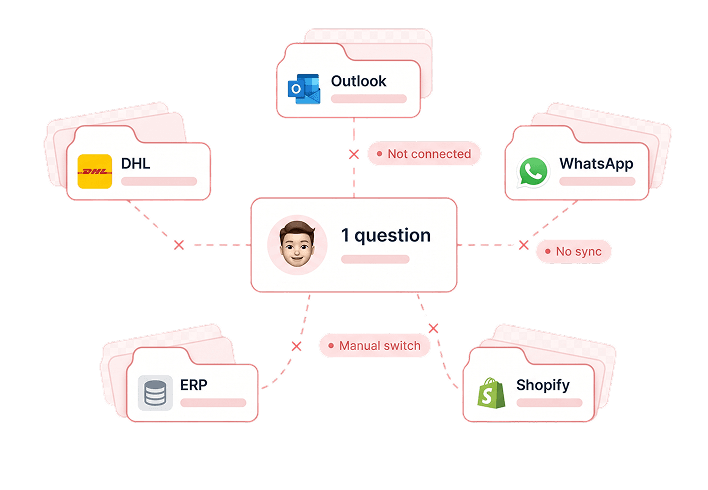
Everything runs by hand
At a lot of shops, nothing in support is automated at all. Every standard question costs your team the same time as the first one, even though these simple cases could run on their own in seconds.

Peak season overwhelms your team
On weekends and during Black Week, requests come in waves while your team stays the same size. The standard cases eat up the time you'd rather spend helping the customers who really need it.
Automation your team feels on day one
Measured across 131 shops and 2.9 million tickets resolved in real production.
resolved
Workflows resolve a ticket in about a day instead of three.
runs automatically
And even more during peak season.
live
You build your first workflow yourself and go live within days.
Workflows for the cases you already know
A workflow recognizes the request, pulls the right data, and handles the case. Exactly the way you set it up.

Recognizes the request itself
The workflow picks up on what a request is about, whether it's order status, a return, or an invoice, and starts on its own. You set once which case triggers which flow.
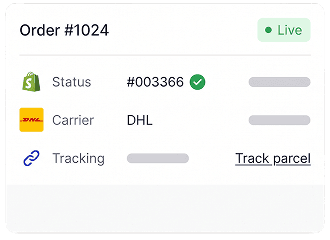
Pulls data and takes action
The workflow connects directly to Shopify, your ERP, and your carrier. It pulls an order status or invoice, changes an address, or triggers a refund, all in the same flow.

Decides by your rules
With if-then logic, the workflow decides what happens next. For complex cases, it hands off cleanly to your team. You set every step and keep full control.
"armincx integrates with our entire tech stack and even automates the Asana tickets for our logistics. I'm seriously impressed with the tool."
What you automate first
Six flows that make up the bulk of tickets at almost any shop. Ready as templates, adapted in minutes with the Co-Pilot.
Order status
The most common request by far, roughly every fourth ticket. The workflow pulls the order number, checks the status and shipment in Shopify and with the carrier, and sends the current tracking link straight back.
Cancellation
When someone wants to cancel, the workflow checks whether the order has already shipped. If it hasn't, it cancels right away and confirms. If it has, it points them to the return process.
Returns
The workflow collects the order number and reason, plus a photo for defective items. It handles simple cases directly, including the refund through Shopify. Complaints go to your team.
Invoice
The workflow pulls the right invoice automatically from BillBee or Xentral and sends it as an attachment, all on its own.
Address change
When a customer sends a new delivery address, the workflow updates it directly in Shopify and confirms the change.
Discount code
The workflow creates a discount code directly in Shopify and sends it to the customer in the same chat.
How you build a workflow
From use case to live in three steps. The AI Co-Pilot is right there with you the whole way.
Pick a use case or describe it
Start with a ready-made template like order status or returns, or just describe your use case in plain language. The Co-Pilot turns it into a working workflow.

Set triggers and actions
With drag-and-drop, you set what starts the workflow and which steps it takes. You test each step on its own before the whole flow goes live.

Go live and optimize
You flip the workflow live and see analytics for every step. So you spot right away what's working and where to sharpen things.

"Whether it's Wednesday at 8pm or Sunday at 1pm, our customers always get the same quality, the same tone, the same helpfulness."
Full control, from day one
Automation can feel like a big leap. With workflows, you stay in control at every moment.
Follows your instructions
A workflow does exactly what you set up, the same way on every ticket. You start in test mode and open things up step by step. So you always know what your customer gets.
Hands off with full context
For complex or sensitive cases, the workflow hands off to your team. The full conversation and all the data come with it. So your team picks up right where it left off.
Grows with your volume
During peak season and as ticket counts climb, the workflow catches the rush around the clock. Your team then focuses on the cases that truly need a person.
Workflows and AI agents work together
The workflow covers the case you know. The AI agent takes the rest and reaches for your workflows as it goes.
Where the workflow ends, the agent thinks ahead
A workflow is perfect for the clear, recurring case. The moment a request steps outside that, combines several issues, or needs context, the AI agent takes over. It understands the whole request and uses your workflows as building blocks wherever they fit. So you automate the known and the unplanned with one and the same system.

Every brand, every market, every language.
Your workflows adapt, no matter how many shops, countries, or languages you serve.
Multi-Brand
Separate workflows for each brand or shop, every one with its own flows, rules, and data.
Multi-Market
Different countries with their own carriers, return windows, and processes. The right workflow runs depending on the market.
Multi-Language
Over 10 languages. The workflow detects the language and replies to your customer in your brand's voice.
Connected to your whole e-commerce stack
armincx integrates deeply with your tools. The workflow pulls data and triggers actions right where they belong.

Shopify
Order status, refunds, address changes, and discount codes straight from the workflow.

Klaviyo
Customer data and segments for personalized flows.

Xentral
Invoices, delivery status, and product data straight into the workflow.

JTL
Orders, customer data, and stock levels from JTL-Wawi.

DHL
Tracking, shipping labels, and returns right in the flow.

Returnista
Manage returns, create labels, and trigger refunds straight from the support dashboard.

Ready for more efficiency in customer service?
Automate routine work, speed up resolutions, and give your team time for the customers who need it most.
All your tools in one place
The complete CX suite for modern e-commerce brands.

Centralized CRM
All customer data, tickets, channel interactions, and purchase histories in one place – connected to Shopify, ERP & more. So your team immediately knows who the customer is, what they need, and what happened last.
Read more →
Ticketing System
Smart ticketing for e-commerce support. Bundle all requests centrally, automate processing intelligently, and maintain full control. Efficient ticket management for faster, better customer service.
Read more →
Multilingual Support
Answer customer inquiries automatically in over 10 languages – without copy-paste or separate teams. The AI detects language and context, keeps your brand voice consistent, and delivers true internationalization in support – fast and close to your customers.
Read more →
AI Agents
Handle complex and multi-topic requests automatically. The AI agent understands the full conversation, draws on your workflows as building blocks, and hands off to your team with full context when needed.
Read more →
Omnichannel Inbox
All your customer interactions – from WhatsApp to email, live chat, social media, and AI telephony – in one intuitive interface. Your team gets a unified view of the entire customer journey and can track all contacts across every channel.
Read more →
Analytics & Dashboards
Track your full ticket volume and optimize your workflows in real time with smart CX analytics. Monitor your AI's automation performance, measure key KPIs, and customize dashboards for targeted insights to proactively improve service quality.
Read more →Over 450 brands automate with armincx
Here's what e-commerce teams across the DACH region say about the Workflow Builder.
Team Vitabay
vitabay

“Finally, an AI that doesn't hallucinate.”
Founder
Onemate

“Finally, an AI workflow builder for the DACH e-commerce space.”
Co-Founder
FarbenLöwe

“POV: you scale your e-commerce business to 20 million, with 2.5 full-timers in support.”
Co-Founder
Naughty Nuts

“The done-for-you package gives us full control and saves us a ton of time and hassle. We benefit directly from the team's best practices.”
Founder
vetain

“All channels, one AI, ERP integration with BillBee, and hands-on support from the founders on Slack Connect. Switching from Gorgias to armincx was a no-brainer for us.”
Team Vitabay
vitabay
“Finally, an AI that doesn't hallucinate.”
Founder
Onemate
“Finally, an AI workflow builder for the DACH e-commerce space.”
Co-Founder
FarbenLöwe
“POV: you scale your e-commerce business to 20 million, with 2.5 full-timers in support.”
Co-Founder
Naughty Nuts
“The done-for-you package gives us full control and saves us a ton of time and hassle. We benefit directly from the team's best practices.”
Founder
vetain
“All channels, one AI, ERP integration with BillBee, and hands-on support from the founders on Slack Connect. Switching from Gorgias to armincx was a no-brainer for us.”
Guides & Best Practices

AI in Customer Service: The Best Tools 2026
Discover the best AI tools for customer service in 2026. Learn how chatbots and automation increase efficiency, reduce costs, and delight customers.

AI Customer Service Chatbots 2026
Discover the best customer service chatbots of 2026 for e-commerce. Learn how AI bots automate support, boost efficiency, and increase customer satisfaction.

Challenges of AI in Customer Service, Benefits and Tools
Learn how AI in customer service boosts efficiency and customer satisfaction. Discover typical challenges, best practices, and the benefits of armincx.
Common questions about the Workflow Builder
A workflow is an automated flow for a recurring support request. It recognizes the request, pulls the data it needs from your systems, and handles the case, from order status to invoices.
No. You build workflows yourself with drag-and-drop. The AI Co-Pilot builds alongside you as soon as you describe your use case in plain language.
The most common cases like order status, cancellations, returns, invoices, address changes, and discount codes. Simple requests run fully automatically, and complex ones the workflow hands off to your team.
You test each step on its own, without running the whole flow. So you see exactly what happens before a customer ever touches it.
The workflow covers the clear, known case. The AI agent takes on special cases and combined requests, reaching for your workflows as it goes.
Within days. You build your first workflow yourself and go live as soon as it's tested.
Yes. armincx processes all data in line with GDPR and stores it on European servers.
Build your first workflow
Take the same repetitive requests off your team and keep response times low, even in peak season.