DSGVO-konform
5-Min-Setup
ISO 27001
armincx is one of the few tools with a native JTL integration. The AI accesses orders, tracking and invoices in JTL directly and executes real actions: cancellations, returns, address changes and invoice delivery.


































Quick check for decision makers
AI customer service directly on your JTL data
armincx accesses orders, tracking numbers and invoices in JTL in real time. Custom-built integration for JTL's limited API.
JTL has a limited API. Standard helpdesk tools cannot simply dock in like they do with Shopify. The Chatarmin team therefore custom-built a JTL integration. Orders (status, tracking, payment status), customer data and invoice documents flow in real time. Changes made by armincx (e.g. cancellation or address change) are written directly back to JTL.
The armincx AI answers customer inquiries and executes real actions: cancellations, returns, address changes and invoice delivery directly in JTL.
The armincx AI recognizes the intent of a message and executes the matching workflow. The AI automatically checks conditions in JTL: Has the order been shipped? Is a tracking number available? Only after successful validation is the action triggered. You configure for each action whether the AI executes it independently or routes it to an agent for approval.
Email, WhatsApp, Instagram, Facebook, live chat and contact forms in one inbox. armincx unifies JTL and Shopify data in one customer profile.
Most JTL customers also use Shopify or Shopware as their shop frontend. armincx shows data from both systems in one customer profile. Your team sees Shopify orders and JTL tracking side by side without switching tabs. The AI automatically decides which system has the most current data.
The first question we hear in almost every conversation with JTL users: do you actually have a working JTL integration? Behind that question lies a legitimate concern. JTL is known for being difficult to integrate. The API has limitations, standard tools often only connect superficially, and most helpdesk systems ignore JTL entirely.
armincx has built its own dedicated JTL integration. Custom-developed, because standard interfaces simply do not work with JTL. The AI accesses your orders, customer data, tracking numbers and invoices in JTL in real time. And it executes real actions: cancellations, returns, address changes and invoice delivery directly in your JTL backend.
This fundamentally sets armincx apart from Zendesk, Freshdesk or Gorgias. Those tools show you a Shopify panel in the ticket at best. JTL data? Not available. Your team copies order numbers from JTL into the reply draft and jumps between three to five tabs.
When a customer writes asking where their shipment is, your team currently has to look it up manually in JTL. armincx eliminates this manual lookup entirely.
The armincx AI recognizes the intent of a customer inquiry and executes the matching action directly in JTL. Fully automated, without manual intervention:
Each action is configurable. You decide what the AI handles independently and what goes to an agent for approval.
One of the strongest use cases for the JTL integration involves B2B wholesalers. Some wholesalers receive up to 100 orders per day via WhatsApp. Currently, an employee manually enters every single order into JTL. That is several working hours per day spent on data entry.
With armincx, the AI recognizes orders from WhatsApp messages and creates them automatically in JTL. This works with photos too: a dealer sends a picture of their order list via WhatsApp, the AI reads the line items and creates the order in JTL. A full employee hour saved per order batch.
This is not a theoretical use case. These are real scenarios from sales conversations with DACH wholesalers who solve this exact problem manually today.
The AI answers "Where is my order?" inquiries automatically with current status and tracking link directly from JTL.
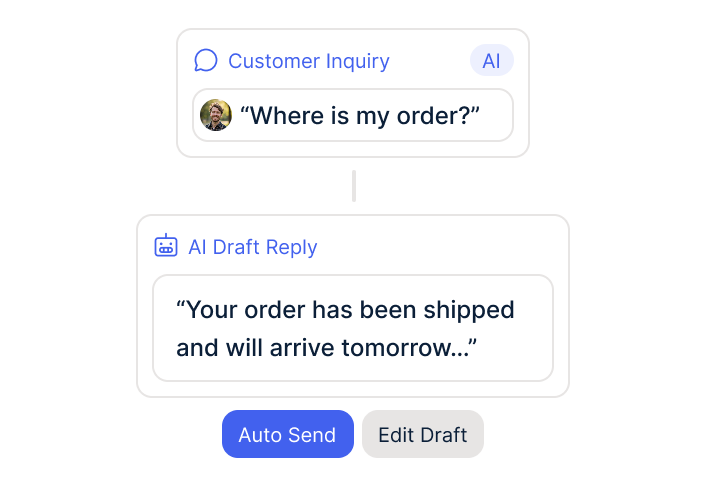
The AI creates returns in JTL, generates return labels and sends them via email or WhatsApp.
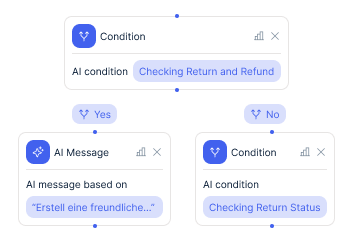
The AI recognizes invoice requests, pulls the invoice from JTL and sends it directly to the customer.
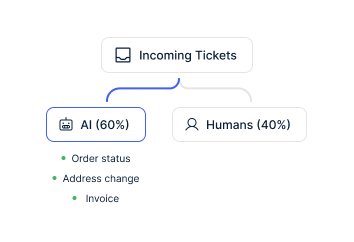
JTL has a limited API. Standard tools cannot simply dock in like they do with Shopify (one-click installation). That is why most helpdesk systems offer no JTL integration. Zendesk, Gorgias, Freshdesk, Intercom. None of these tools can directly access JTL data or execute actions in JTL.
The Chatarmin team custom-built the JTL integration because the DACH market cannot be served without JTL connectivity. 89% of JTL customers in our sales conversations also use Shopify. The typical DACH stack looks like this: Shopify or Shopware as the shop frontend, JTL as the ERP backend, DHL as the shipping provider. armincx connects all three systems and pulls data from the correct backend.
When the tracking number sits in JTL (because your shipping runs through JTL rather than the Shopify DHL app), armincx pulls tracking from JTL. When order data sits in Shopify, armincx accesses Shopify. The AI automatically decides which system has the most current data.
The armincx JTL integration targets DACH mid-market retailers with 200+ tickets per month and JTL as their ERP system. Three typical profiles:
This multi-system reality is exactly what armincx solves. Your team no longer needs to search across three systems simultaneously.
Your JTL-based shop is growing but you do not want to proportionally expand the support team. With armincx you decouple growth from headcount.
The AI answers 70-95% of repetitive inquiries automatically. Instead of spending all day on WISMO questions and invoice requests, your team has capacity for complex complaints and cases that require real product expertise.
During seasonal peaks (Q4 brings 2-3x the normal ticket volume for many shops), the AI absorbs the extra load. You do not need to train temporary staff who leave after the peak. And you do not need to close support on Friday afternoon because nobody is left. The AI responds on Sunday evenings too, when customers shop from the couch.
5 to 15x cheaper than a manually handled ticket. That is the benchmark from over 450 e-commerce brands working with Chatarmin.


Disclaimer: All data conducted from over 50+ Sales Calls with DACH Ecom Owners
armincx works on a flat-rate model. You pay no per-agent seat costs and no per-ticket costs. For JTL shops with growing volume this means: your costs stay predictable even when ticket volume triples in Q4.
Meta costs for WhatsApp messages are 11 cents per marketing message in Germany and around 5 cents in Austria and Switzerland (as of 2026). Service messages within the 24-hour window are free. WhatsApp generates 2 to 3x higher revenue per recipient than email. After deducting the Meta fee, you retain 139% higher net margin than via email.
armincx software pricing is not publicly communicated. In a demo we calculate your individual business case together based on ticket volume, number of channels and desired automation level.
The short answer: Zendesk and Gorgias have no JTL integration. Full stop.
The longer answer: Zendesk shows you Shopify data in a side panel at best. JTL data must be looked up manually. The Zendesk AI generates text suggestions but does not execute actions in JTL. Large Zendesk installations cost an additional EUR 20,000-40,000 in setup through implementation partners like Leafworks.
Gorgias charges per ticket and also has no JTL connectivity. Your team copies order numbers from JTL into Gorgias macros and jumps between tabs.
armincx was built for the DACH e-commerce market. The JTL integration was not an afterthought but a deliberate decision, because the German mid-market cannot be served without JTL connectivity. The AI executes actions directly in JTL, without tab switching, without copy-paste.
The AI automatically recognizes when it cannot confidently answer an inquiry and escalates to a human agent. It delivers a prepared draft and all collected customer data. The agent only needs to review and send.
For incomplete inquiries (e.g. missing order number, no photos for a complaint), the AI first asks for the missing information before escalating. This saves your team the back-and-forth.
You configure the escalation rules yourself. Refunds under EUR 50 are handled by the AI independently. Above EUR 50 it creates a draft for approval. Complaints on high-value products go directly to a senior agent.
What leading E-Commerce brands from the DACH region say about armincx
Victor Horst
cusbclo

“If you’re not using WhatsApp marketing yet, go to Chatarmin.”
Lisa Krapinger-Ruether
NEOH

“Chatarmin helps our company tremendously to deliver our news and promotions to customers better and faster.”
Florian Wimmer
Purora

“Efficient tool with versatile features, fast integration, and a competent team.”
cusbclo
“If you’re not using WhatsApp marketing yet, go to Chatarmin.”
NEOH
“Chatarmin helps our company tremendously to deliver our news and promotions to customers better and faster.”
Purora
“Efficient tool with versatile features, fast integration, and a competent team.”

Create your armincx account and set up JTL API access.

Establish the API connection and connect channels (email, WhatsApp, social).
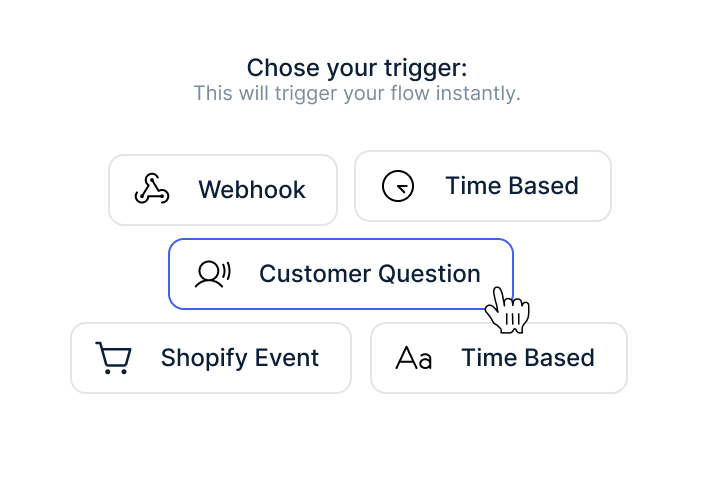
Configure AI workflows and launch your first automated responses.
Create your armincx account and set up JTL API access.
Establish the API connection and connect channels (email, WhatsApp, social).
Configure AI workflows and launch your first automated responses.
Onboarding for the JTL integration runs in four steps:
The entire onboarding is guided personally by the Chatarmin team, in German. No external implementation partner. First automated responses go live within days.
If you have a multi-system setup (Shopify + JTL + DHL), the Chatarmin solution engineering team coordinates the integration of all systems. For JTL customers this is the norm, because JTL almost always runs alongside a shop system.
armincx hosts all data on servers in Germany. The AI processes customer data exclusively on EU infrastructure. A data processing agreement (DPA) is standard. The WhatsApp Business API runs GDPR-compliant via the official Meta Cloud API.
The AI accesses JTL data within the scope of customer service interactions. Data is not used for training purposes. Data separation between armincx and your JTL system is technically guaranteed.
Everything you need to know about the JTL armincx integration.
Yes. The Chatarmin team custom-built a JTL integration specifically for JTL's limited API. The integration covers order status, returns, cancellations, invoices, address changes, DHL tracking and custom fields. armincx is one of the few helpdesk tools with native JTL connectivity.
Yes. When your DHL tracking number is stored in JTL (not Shopify), armincx accesses JTL. The AI automatically recognizes which system contains the tracking information. In multi-system setups (Shopify + JTL + DHL), armincx pulls data from whichever system is most current.
Yes. The AI recognizes orders from WhatsApp messages and creates them in JTL. This works with photos too: a dealer sends a picture of their order list, the AI reads the line items and creates the order. Wholesalers with up to 100 WhatsApp orders per day fully automate this process.
The Chatarmin team guides the onboarding personally and knows the JTL API quirks. Technical setup is ready within days. First automated responses go live right after. The full automation rate of 40-60% is reached within the first weeks.
No. You only need JTL API access. The Chatarmin team handles the technical setup. For multi-system setups (e.g. Shopify + JTL + DHL), the solution engineering team coordinates the integration of all systems.
Yes. armincx hosts all data on servers in Germany. A data processing agreement (DPA) is standard. The AI processes customer data exclusively on EU infrastructure. Data is not used for training purposes.