
The WhatsApp Business API is Meta's official interface for connecting WhatsApp to your software: your shop, CRM, helpdesk or chatbot. Most e-commerce brands get access through a Meta Business Partner such as Chatarmin. Meta charges per delivered message, based on the message category and the recipient's country.
This guide shows you how the API works and what it costs after Meta's pricing change in October 2026. You will learn how to set it up for Germany, Austria and Switzerland and how to spot a good provider.
What is the WhatsApp Business API?
The WhatsApp Business API is the part of the WhatsApp Business Platform that software uses to send and receive messages. You always use it through a tool that is connected to the interface, for example Chatarmin, your CRM or an application you build yourself.
Since October 2025 there has only been one version: the Cloud API, which Meta hosts itself. Meta switched off the former On-Premises API, which companies ran on their own servers, for good on 23 October 2025.
How does the WhatsApp Business API work?
The API works with two types of messages: templates and free-form replies. Which one you can use depends on the customer service window.
- Templates: You start a conversation with a template that Meta has approved, for example a newsletter, a shipping confirmation or a one-time code. You need a template whenever the customer has not messaged you in the last 24 hours.
- Free-form replies: Every customer message opens a 24-hour customer service window. Within it, you reply without a template, just like in a normal chat.
Incoming messages reach your software via webhook. Your software sends outgoing messages to Meta through the interface, and Meta delivers them. Meta assigns every outgoing message to one of four categories. Templates are Marketing, Utility or Authentication, and free-form replies within the customer service window count as Service. The category determines the price. For the technical details on webhooks, templates and tokens, read our technical guide to WhatsApp Business API integration.
Does WhatsApp have an official API?
Yes. The official API is the WhatsApp Business Platform, technically the Cloud API. There are also unofficial tools that automate WhatsApp Web or the app. These usually breach WhatsApp's terms of service and put your number at risk of being banned. For marketing and customer service in an online shop, the official API is the only safe route.
WhatsApp Business App vs. API: What is the difference?
The app is built for individuals on a smartphone, the API for teams and automated workflows. For a small shop with a handful of chats a day, the free app is enough. As soon as several people reply, messages are triggered from your shop or you send newsletters, you need the API.
| Criterion | WhatsApp Business App | WhatsApp Business API |
|---|---|---|
| Operation | App on a smartphone | Via software such as Chatarmin |
| Team | A few linked devices | Whole team in a shared inbox |
| Automation | Greeting and away messages | Flows, chatbots, AI agents, shop triggers |
| Bulk messaging | Broadcast lists with a cap | Marketing templates to opted-in contacts |
| Integrations | Product catalogue in the app | Shop, CRM, helpdesk, email marketing tool |
| Costs | Free | Meta fee per message plus provider |
For the full feature comparison, read WhatsApp Business App vs. API.
App and API can now also run side by side. With WhatsApp Coexistence you use both on the same number. Your team keeps chatting on the phone while campaigns and automations run through the API.
Benefits of the WhatsApp Business API for online shops
The biggest benefit is reach in your customers' inbox. In our WhatsApp open rate benchmark, the median open rate is 72 % across 414 brands. Even that median is roughly three times the open rate of a good email campaign.
On top of that, you get four benefits the app does not offer:
- Teamwork: Several team members answer chats from one number, with assignment, notes and history.
- Automation with shop data: Abandoned cart reminders, shipping updates or review requests start automatically as soon as something happens in your shop.
- AI in customer service: An AI agent such as armincx by Chatarmin answers questions about order status or returns using the data from your shop.
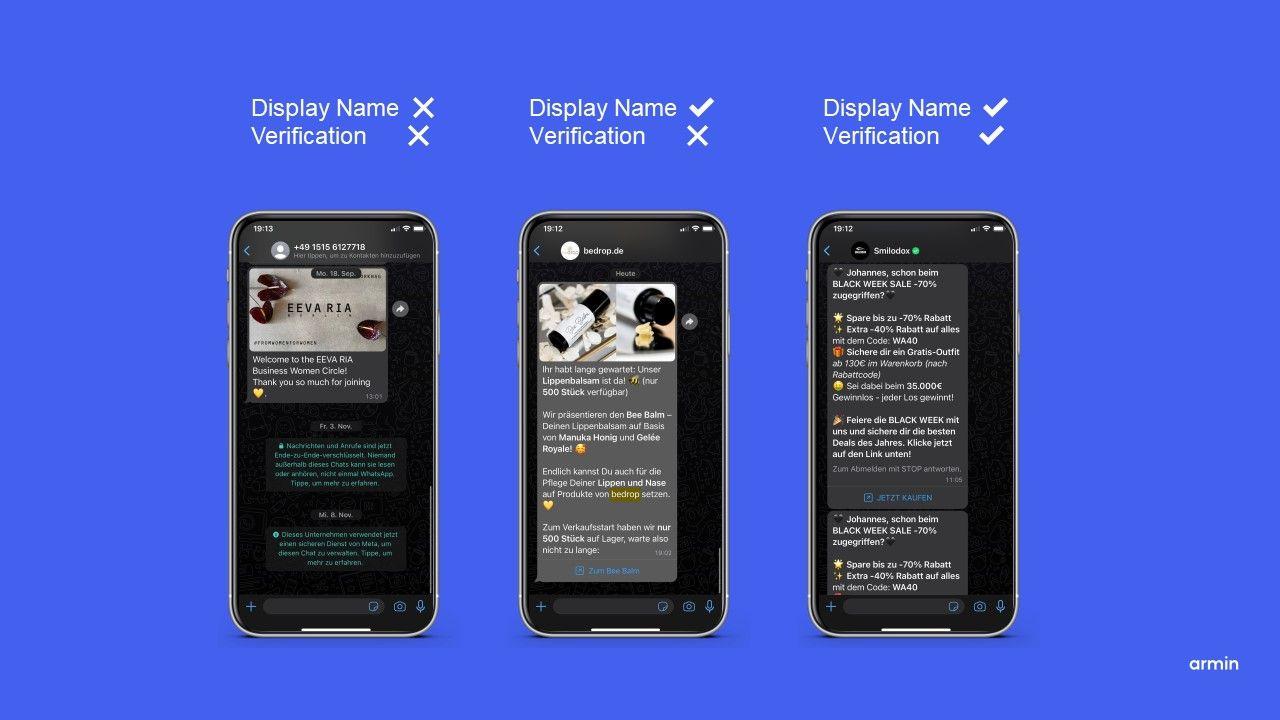
- Trust: Your profile shows your company name, description and contact details. With the green tick, customers can also see that they are chatting with the real business.
The API has its limits, too. You need an opt-in for every promotional message, Meta has to approve every template, and every outgoing message costs money. If you treat WhatsApp like an email list and send unsolicited promotions, your quality rating drops quickly and your reach with it.
How much does the WhatsApp Business API cost?
The costs have two parts: Meta's fees per message and your provider's fee for the software. Meta has charged per delivered message since 1 July 2025. Before that, it used a model based on 24-hour conversations, which many older articles still describe.
Two new rules have applied since 1 October 2026:
- Service messages cost money. The first 1,000 delivered service messages per business phone number per month are free. After that, you pay per message. Unused free messages expire at the end of the month.
- Utility templates are charged inside the customer service window, too. A shipping confirmation is therefore charged even if the customer has just messaged you.
Incoming messages are free. If a customer messages you via a Click-to-WhatsApp ad, message fees are waived for up to seven days, provided you reply within 24 hours.
Meta prices per delivered message (source: Meta EUR rate card, effective 1 October 2026)
| Category | Germany | Austria | Switzerland |
|---|---|---|---|
| Marketing | €0.1131 | €0.0490 | €0.0490 |
| Utility | €0.0456 | €0.0142 | €0.0142 |
| Authentication | €0.0456 | €0.0142 | €0.0142 |
| Service (after 1,000 free messages) | €0.0456 | €0.0142 | €0.0142 |
Austria and Switzerland fall into Meta's "Rest of Western Europe" pricing region. What counts is always the recipient's country. This matters for DACH brands: a marketing message to a German number costs more than twice as much as one to an Austrian or Swiss number. Meta can only change prices on 1 January, 1 April, 1 July and 1 October. You will find the current rates on Meta's pricing page.
For volume discounts, sample calculations and tips on saving money, read our article on WhatsApp Business costs.
Is the WhatsApp Business API free?
Partly. Incoming messages, the first 1,000 service messages per number and month, and the free window after a Click-to-WhatsApp ad cost nothing. Outside these cases, Marketing, Utility and Authentication templates are always charged. Your provider's software comes on top in every case, because you cannot operate the API without a tool.
Setting up the WhatsApp Business API: step by step
Setup usually takes just a few steps if you have your documents ready. This is how it works with a provider such as Chatarmin:
- Check the requirements. You need a Meta business portfolio (formerly Business Manager), a website and a phone number that can receive a verification code by SMS or call. Also have official company documents ready for verification, for example an extract from the commercial register (Handelsregister) or a business registration (Gewerbeanmeldung).
- Choose a provider and start registration. Through your provider's Embedded Signup, you connect your business portfolio to WhatsApp. In the process, you create your WhatsApp Business Account and register the number.
- Set your display name. The display name appears in your number's profile. Meta reviews it as soon as you reach a higher messaging limit or change the name. You can change it up to ten times in 30 days.
- Verify your business. New business portfolios start with 250 recipients outside the customer service window per 24 hours. Verification takes you to 2,000.
- Create templates. You submit every template for review. Meta assigns it a category and approves or rejects it.
- Connect your systems and collect opt-ins. Connect your shop and CRM and add opt-in points, for example at checkout, via a pop-up or with a QR code in the parcel.
How do I get access to the WhatsApp Business API in Germany?
The process in Germany, Austria and Switzerland is the same as in the rest of the EU. Online shops without their own development team go through a Meta Business Partner. Teams with developers can also connect the Cloud API directly with Meta, but then have to build the interface, inbox and integrations themselves. In the DACH region, pay particular attention to a data processing agreement and to support in German.
How do I get approval for the WhatsApp Business API?
Meta reviews three things: your business, your display name and every single template. Business verification runs through your Meta business portfolio with official company documents. The display name has to match your brand. Meta reviews every template before you send it for the first time.
Can I use the WhatsApp Business API without a website?
In most cases, you need a website. The website field is mandatory by default during registration. Only selected Meta partners can onboard businesses without a website. These businesses can only send messages once the partner has verified them.
WhatsApp API integration: connecting your shop, CRM and helpdesk
The API shows its value once it talks to your systems. There are three ways to get there:
- Ready-made integrations from your provider: Chatarmin connects directly to Shopify, Shopware, Klaviyo, HubSpot, Zendesk, Gorgias and other tools that DACH online shops use. You will find the full list in our overview of WhatsApp integrations.
- Automation tools: With Zapier, you connect systems that have no direct integration.
- Custom development: With webhooks and the Cloud API, you build your own connection. This mainly pays off for companies with an in-house development team and very specific workflows.
With a tool such as armincx, you bring WhatsApp, Instagram, Facebook Messenger and email together in one shared inbox. Customers write on their favourite channel, and your team sees everything in one place.
How do you integrate the WhatsApp Business API with a CRM?
With a CRM integration, your WhatsApp tool and your CRM exchange contacts, chat histories and events. With the HubSpot integration, for example, new WhatsApp contacts land straight in your CRM as contacts. In the other direction, a status change in the CRM automatically triggers a WhatsApp message. Your sales team can always see what the customer last wrote about.
WhatsApp Business API with chatbots and AI
A chatbot follows fixed rules, while an AI agent understands open questions and answers with your data. For simple flows such as product advice with three buttons, a WhatsApp chatbot is enough. For customer service, an AI agent is the better fit. armincx accesses orders, shipping data and your help centre and uses them to answer questions like "Where is my parcel?" without your team. Replies from an AI such as armincx within the customer service window count as service messages at Meta.
Limits, quality rating and rules
Meta uses messaging limits to set how many customers you can reach outside the customer service window. The limit applies to unique recipients within 24 hours and to your entire business portfolio. All numbers in the portfolio therefore share the same allowance.
| Tier | Recipients per 24 hours |
|---|---|
| Start | 250 |
| Tier 1 | 2,000 |
| Tier 2 | 10,000 |
| Tier 3 | 100,000 |
| Tier 4 | Unlimited |
You reach 2,000 through business verification or by sending 2,000 delivered high-quality templates within 30 days. From then on, the limit rises automatically by one tier within six hours. This requires high-quality messages and that you have used at least half of your limit in the last seven days. Read more in our article on WhatsApp messaging limits.
Your quality rating depends on how recipients react to your messages. If many customers block or report your templates, your rating drops and your limit stops growing. Three rules keep your quality high:
- Only message contacts who have actively opted in.
- Choose the template category honestly. An order confirmation with a discount code counts as Marketing.
- Segment your campaigns instead of sending every message to all contacts.
WhatsApp Business API and GDPR
The API is a solid basis for GDPR-compliant communication, but what matters is how you implement it. You need to clarify three points:
- Consent: For marketing messages, you need a documented opt-in. Record when and where the customer gave consent.
- Data processing: You sign a data processing agreement (DPA) with your provider.
- Data flow: Messages travel encrypted between the customer and the Cloud API. There, Meta decrypts them and forwards them to your provider. Meta stores messages encrypted for a maximum of 30 days. For data transfers from the EU to the US, Meta states that it relies on GDPR-compliant transfer mechanisms.
You can read how Chatarmin handles these points on our page about WhatsApp and GDPR. For your specific case, it is best to consult your data protection officer.
What role does the official API play in data protection?
The official API is what makes data protection plannable in the first place. Chats run through a central tool instead of your employees' private phones. You manage access rights, deletion periods and opt-ins in one place, and you have a data processing agreement with your provider. Unofficial tools lack this foundation entirely.
WhatsApp Business API providers: how to choose the right partner
The right provider fits your tech stack, your team and your volume. Check these six points before you decide:
- Meta partner status: Official Meta Business Partners work directly with Meta. Only certain partners can, for example, verify businesses without their own website.
- Meta fees: Ask whether the provider passes Meta's fees on one to one or adds a markup.
- Integrations: Are there ready-made integrations with your shop, CRM and helpdesk?
- Team and AI: Does the tool offer a shared inbox, flows and an AI agent?
- Data protection: Do you get a data processing agreement, and where does the provider process your data?
- Onboarding and support: Will someone help you with setup, verification and your first campaigns, ideally in German?
WhatsApp Business API providers at a glance (as of 4 November 2026, based on the providers' websites)
| Provider | Headquarters | Meta partner (as stated by provider) | Meta fees | Focus as stated by provider |
|---|---|---|---|---|
| Chatarmin | Vienna | Meta Business Partner since September 2026 | Passed on 1:1 without markup | E-commerce brands, 510+ brands |
| Superchat | Berlin | "Meta business partner" | Passed on 1:1 without markup | Businesses of every size and industry |
| hellomateo | Potsdam | Not stated on website | No markup | Local businesses such as car dealerships, opticians and retail, plus e-commerce |
| Charles | Berlin | WhatsApp Solution Provider (BSP) | Not stated on website | E-commerce, retail and automotive |
| respond.io | Kuala Lumpur | Meta Business Partner, BSP since 2023 | No markup | Mid-market businesses with high chat volumes |
Sources: Superchat homepage, Superchat imprint, Superchat help centre, hellomateo imprint, hellomateo pricing, Charles about, Charles homepage, respond.io about, respond.io FAQ.
Chatarmin is built for e-commerce brands in the DACH region. 510+ brands use Chatarmin for WhatsApp marketing and customer service. You get ready-made integrations with Shopify, Shopware and Klaviyo, Coexistence for your existing number and, with armincx, an AI agent for support. Chatarmin has been an official Meta Business Partner since September 2026.
Using the API for e-commerce marketing and customer service
In e-commerce, you mainly use the API for six workflows. The category in brackets determines what the message costs:
- Newsletters and campaigns to opted-in contacts (Marketing)
- Abandoned cart reminders for open baskets (Marketing)
- Order and shipping updates straight from your shop (Utility)
- Back-in-stock alerts for sold-out products (Marketing)
- Customer service on order status, returns and product questions (Service)
- One-time codes for login or payment confirmation (Authentication)
Start with a workflow that brings in revenue quickly, usually abandoned cart reminders or a welcome flow. Then expand step by step into campaigns and customer service.
Find out what WhatsApp can do for your shop: book a demo. 15 minutes, free of charge and with concrete figures for your shop.
FAQ: Frequently asked questions about the WhatsApp Business API
Which messages can I send via the WhatsApp Business API?
You can send templates to opted-in contacts at any time and free-form replies only within the 24-hour customer service window. Meta has to approve every template first.
How many messages can I send via the WhatsApp Business API?
New business portfolios can reach 250 recipients outside the customer service window per 24 hours. With verification and high quality, the limit rises step by step up to unlimited.
How much does a message via the WhatsApp Business API cost?
The price is usage-based and depends on the message category and the recipient's country. You will find Meta's current prices for Germany, Austria and Switzerland in the table in the costs section.
How do I set up the WhatsApp Business API?
You need a Meta business portfolio, a website and a phone number, which you connect to WhatsApp through a provider's Embedded Signup. You then verify your business, create templates and connect your systems.
Can I keep using my existing WhatsApp Business number?
Yes. With WhatsApp Coexistence, you use the Business App and the API on the same number at the same time.
Do I need a provider for the WhatsApp Business API?
It depends. With your own development team, you can connect the Cloud API directly, and without developers you need a provider that brings an inbox, automation and integrations.
Is the WhatsApp Business API GDPR-compliant?
It depends. The API provides the basis, but your use only becomes GDPR-compliant with a documented opt-in and a data processing agreement.
Can I use the WhatsApp Business API for newsletters?
Yes. You send newsletters as Marketing templates to contacts who have opted in beforehand.