
Last week, a client called us. Successful Shopify store, 40,000 subscribers, first WhatsApp campaign planned. He wanted to "just blast 40k messages." His account was unverified.
That would have been an expensive mistake. Because unverified accounts don't start at 1,000 messages in 2026 – they start at 250.
The WhatsApp Business API messaging limits have fundamentally changed since October 2025. Anyone operating with 2024 knowledge is risking banned accounts, failed campaigns, and lost revenue. This guide explains the new rules – from Tier 0 to Unlimited, from portfolio limits to throughput, from frequency capping to the US market freeze.
What Are WhatsApp Messaging Limits?
WhatsApp messaging limits determine how many unique users you can reach with business-initiated messages within 24 hours. These limits apply exclusively to the WhatsApp Business API – not the regular Business App.
The mechanism behind it: Meta protects its users from spam. The better your track record, the more reach you get. The worse it is, the faster you hit a dead end.
But here's where it gets complicated: There's not just one limit, but two parallel systems running simultaneously.
1. Messaging Limit (Volume): How many different people you can contact per day.
2. Throughput (Speed): How fast those messages go out – measured in Messages per Second (MPS).
Most guides only talk about the first one. That's not enough. What good is a 100,000 limit if you can only send 80 messages per second? For a flash sale starting at 8 PM, you need over 10 minutes for 50,000 recipients – and the first buyers have already checked out before the last ones even see the message.
The 5 Tier Levels: From 250 to Unlimited
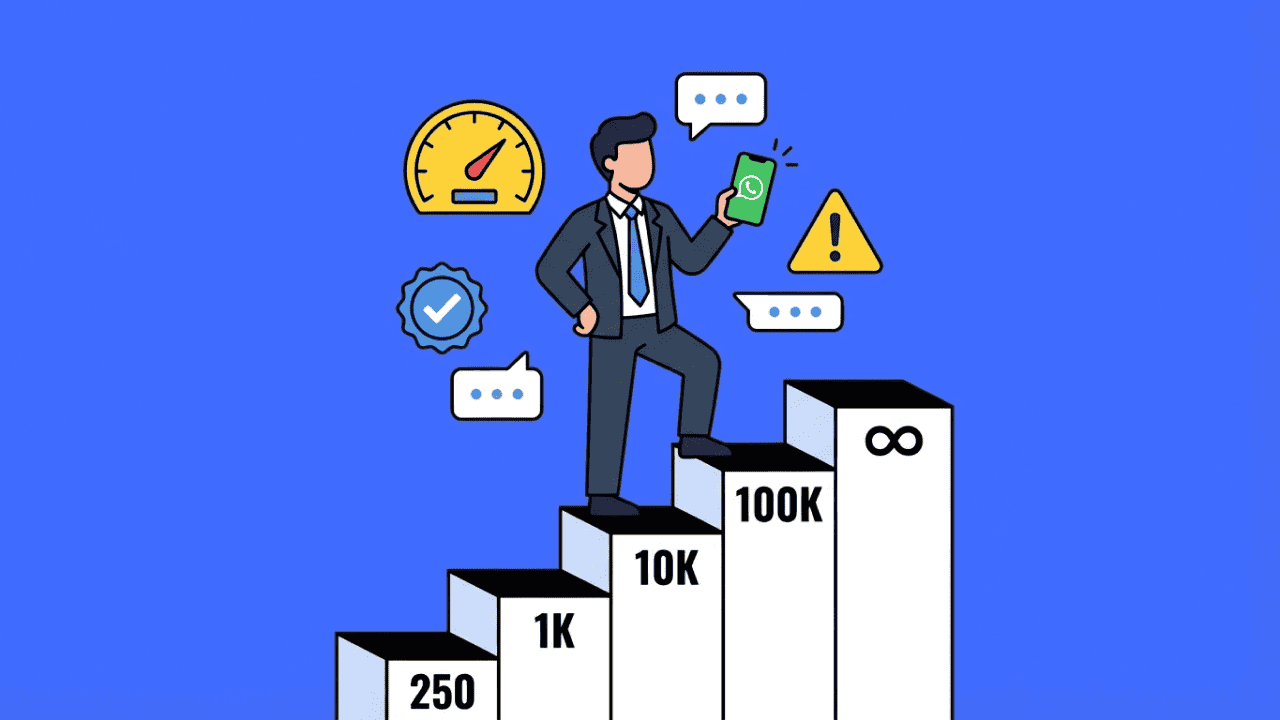
According to official Meta Cloud API documentation and partner updates from Wati and Gallabox, the 2026 tier system looks like this:
| Tier | Limit (unique users/24h) | Throughput | Status |
|---|---|---|---|
| Tier 0 | 250 | ~80 MPS | Unverified |
| Tier 1 | 1,000 | ~80 MPS | After verification |
| Tier 2 | 10,000 | ~80 MPS | First scaling |
| Tier 3 | 100,000 | ~80 MPS | Established brands |
| Tier 4 | Unlimited | up to 1,000 MPS | Enterprise |
What most people miss: Tier 0 exists. New business portfolios without completed business verification start at 250 messages per 24 hours. Not 1,000 – two hundred fifty. Only after verification in Meta Business Manager do you jump to Tier 1.
And the throughput jump at Tier 4 is massive. Standard accounts send at about 80 messages per second. Unlimited tier accounts with stable quality are automatically upgraded to up to 1,000 MPS. That's the difference between "campaign runs 17 minutes" and "campaign is done in 100 seconds."
The Revolution: Portfolio Limits Instead of Number Limits
Until October 2025, you had to warm up each new phone number individually. New number for the second store? Back to Tier 1. Weeks of slow climbing.
That's over.
Since October 2025, messaging limits no longer apply per phone number, but per Business Portfolio. Analyses from Meta partners like Gallabox confirm: All numbers in the same Business Manager share the highest achieved limit.
In practice, this means: If your existing WhatsApp account is at Tier 3, every new number in your portfolio instantly inherits this 100,000 limit. No warm-up. You activate a number for the UK market and can immediately send at full capacity.
For companies with multiple locations, brands, or countries, this is a massive lever. Instead of building up parallel accounts for months, the entire portfolio benefits from its strongest member.
The flip side: Poor performance on one number drags down the limit of the entire portfolio. A sloppily segmented blast on number 3 can jeopardize your established Tier 3 on number 1. Portfolio limits reward quality – and punish carelessness harder than ever before.
Faster Upgrades: The 6-Hour Rule
Previously, the advice was: Wait 24-48 hours until Meta reviews your limit.
In 2026, Meta checks every 6 hours whether you qualify for the next tier.
The conditions for an upgrade:
You've used at least 50% of your current limit in the last 7 days
Your quality rating is stable (ideally green)
No significant complaints or blocks
Theoretically, you can jump from Tier 1 to Tier 2 within a single day. In practice, we see WhatsApp campaigns with clean segmentation achieving upgrades within 24-48 hours.
Quality Rating: The Real Gatekeeper
Your quality rating determines whether you ascend, stagnate, or crash. Meta evaluates three categories:
Green (High): All clear. You can scale.
Yellow (Medium): Warning signal. Further deterioration can lead to limit reduction.
Red (Low): Acute danger. Your limit can be reduced at any time.
What influences the rating? User blocks, spam reports, template quality. The tricky part: Meta shows you the traffic light, but not the exact thresholds.
Important change in 2026: A red rating prevents advancement to the next tier but no longer automatically leads to immediate downgrade – as long as there are no policy violations. This gives you time to course-correct.
Frequency Capping: The Invisible Limit
This is where it gets interesting – and most marketers have never heard of it.
Since 2025, Meta doesn't just limit how many messages you can send. Meta also limits how many marketing messages an individual user can receive per day – across all brands.
Analyses from Insider Academy show: The limit is approximately 2 marketing templates per user per day. Not 2 from you – 2 total, from all companies combined.
What this means: If your customer already received promos from two other shops this morning, your message might not get through – even if you did everything right.
You'll recognize this by error code 131049. It doesn't mean your system is broken. It means the user is "saturated."
The consequence: Relevance beats volume. One well-timed, personalized message achieves more than three generic blasts. WhatsApp Automation helps distribute send times intelligently and reduce frequency capping issues.
US Market Warning: Marketing Templates Paused
Everyone expanding internationally needs to know this: Since April 2025, marketing template messages to US numbers (+1 area code) are temporarily paused.
As TechCrunch and PCMag consistently report, Meta is responding to regulatory pressure and user complaints in the US. Utility messages (order confirmations, shipping updates) and authentication templates (OTPs) continue to work.
For European companies with US expansion plans, this means: WhatsApp marketing in the US is currently not an option. Plan your campaigns accordingly.
Authentication Templates: The Hidden Hurdle
Another trap for tech products and apps: To use authentication templates (one-time passwords, login codes), you must meet two conditions:
Your business is verified
You've reached at least the 1,000 limit (Tier 1)
Unverified accounts at Tier 0 cannot send OTPs via WhatsApp. Anyone planning an app with WhatsApp login must complete verification first.
AI & Chatbots: What's Still Allowed in 2026
Since January 15, 2026, Meta has banned "General Purpose AI Chatbots" on WhatsApp. As PCMag and TechCrunch report, this policy change aims to sharpen WhatsApp as a business channel.
Banned: Open ChatGPT clones without business context, AI systems posing as "friends," bots without clear business purpose.
Allowed: Support automation (FAQ, order status, returns), sales flows (product consultation, lead qualification), AI-powered customer service agents with defined scope.
The difference: Your AI must be a tool that supports your business – not the main product itself. At Chatarmin, all AI solutions are designed this way from the start.
From Practice: Three Strategies That Work
Not every brand needs to reach Tier 4. Depending on the starting point, different paths lead to success.
The Volume Path: Smilodox achieved €261,676 in revenue with a single summer sale campaign at 9.6x ROAS. The key: Large list size, but clean segmentation. €2.07 revenue per recipient shows that mass and class work together – when the infrastructure is solid.
The Efficiency Path: bedrop generated €163,983 in revenue in 4 days with "4 Days 4 Goodies" at 13.5x ROAS. 1,874 orders, €87.50 AOV. The strategy: A new deal every day, targeted messaging, artificial scarcity.
The Precision Path: VETAIN shows that small lists can deliver massive results: €44,469 revenue at only €131 cost – a ROAS of 33.9x. Conversion rate: 4.7%. Few messages, perfectly timed.
Three brands, three strategies, one common denominator: Quality rating in the green zone, clean segmentation, no cold contacts.
Common Mistakes That Lead to Bans
Messaging cold contacts: WhatsApp is not a cold outreach channel. Without explicit opt-in, you'll collect blocks and destroy your rating.
Ignoring frequency capping: When delivery rates suddenly drop, frequency capping is often the culprit. Check for error code 131049.
Choosing the wrong template category: Promotional content in utility templates leads to rejections. Category must match content.
No opt-out option: Every marketing message needs an easy unsubscribe option. Without it, frustration leads to blocks.
Ignoring the US market: Marketing templates to +1 numbers won't be delivered. Utility works, marketing doesn't.
Conclusion: Limits Are a Quality Filter
WhatsApp messaging limits feel like restrictions. In reality, they're a filter that separates spam from real marketing.
The 2025/2026 changes – portfolio limits, 6-hour checks, frequency capping, US pause – reward companies that understand: WhatsApp is a privilege, not a right. A direct channel to people who want your messages.
Those who understand this will scale. Those who ignore it will get banned.
Want to scale your limits safely?
Book your demo with Chatarmin now and learn how to go from Tier 0 to Unlimited with professional infrastructure – without risking your quality rating.
FAQ: WhatsApp Messaging Limits 2026
What is the WhatsApp messaging limit for new accounts?
Unverified portfolios start with 250 messages per 24 hours. After business verification, the limit immediately increases to 1,000 (Tier 1).
How do I increase my WhatsApp messaging limit quickly?
Use at least 50% of your current limit within 7 days while maintaining high quality. Meta checks every 6 hours whether you can upgrade.
What does error code 131049 mean on WhatsApp?
Frequency capping has been reached: The user has already received too many marketing messages from businesses today. Your message is blocked even though your account is working fine.
Do messaging limits apply per number or per account?
Since October 2025, limits are portfolio-based. All phone numbers in a Business Manager share the highest achieved limit.
How many messages can I send per second?
Standard throughput is approximately 80 messages per second. Accounts in the Unlimited tier can be automatically upgraded to up to 1,000 MPS.
Do user replies count toward messaging limits?
No. When a user messages you, a 24-hour service window opens. Messages within this window don't count against your limit for new contacts.
Can I send marketing messages to the US?
Currently, marketing templates to +1 numbers are paused. Utility and authentication messages still work.
Why was my WhatsApp template rejected?
Common reasons: Promotional content in utility templates, incorrect placeholder formatting, violations of commerce policy. Check if category and content match.
What happens with a red quality rating?
A red rating prevents advancement to the next tier. Unlike before, it no longer automatically leads to immediate downgrade – as long as there are no policy violations.
Are AI chatbots still allowed on WhatsApp in 2026?
Yes, if they serve a clear business purpose (support, sales). Pure "general purpose" AI assistants without business context are banned since January 2026.