
98% open rate. That's not a typo. While email campaigns struggle to hit 20%, WhatsApp messages get opened almost every time. Click-through rates sit at 45-60% – numbers that email marketers can only dream of.
But you won't hit these numbers with the regular WhatsApp Business App. That's built for the corner shop, not for businesses that need to scale. If you need automation, GDPR compliance, and real CRM integration in 2026, you need the WhatsApp Business API.
This guide covers the technical requirements, the new features for 2026 – and where most integrations fail.
Cloud API vs. On-Premise: Why Cloud Wins in 2026
Meta made the decision for you: Cloud API is the standard. On-premise still exists on paper, but it's effectively dead for new use cases.
What does Cloud API give you?
The infrastructure runs entirely on Meta's servers. No server setup, no security updates, no DevOps team for maintenance. Meta handles all of it. Capacity: up to 500 messages per second – sending and receiving combined. That's enough for Black Friday campaigns with hundreds of thousands of recipients.
On-premise only makes sense for banks or government agencies with their own data centers and extreme compliance requirements. For e-commerce, it's overkill – and a money pit.
Requirements for WhatsApp Business API Integration
Since 2025, the Shared Account Model applies. The old "On-Behalf-Of" model, where providers managed WhatsApp Business Accounts (WABA) for clients, no longer exists. You must own your own account.
Sounds like bureaucracy, but it gives you full control over your data and your number – important for GDPR and data migration.
Your checklist:
Verified Meta Business Manager – verification takes 2-5 business days, up to 14 days if documents are incomplete.
Dedicated phone number – cannot be active in the WhatsApp App at the same time.
Two-factor authentication (2FA) – mandatory since 2024.
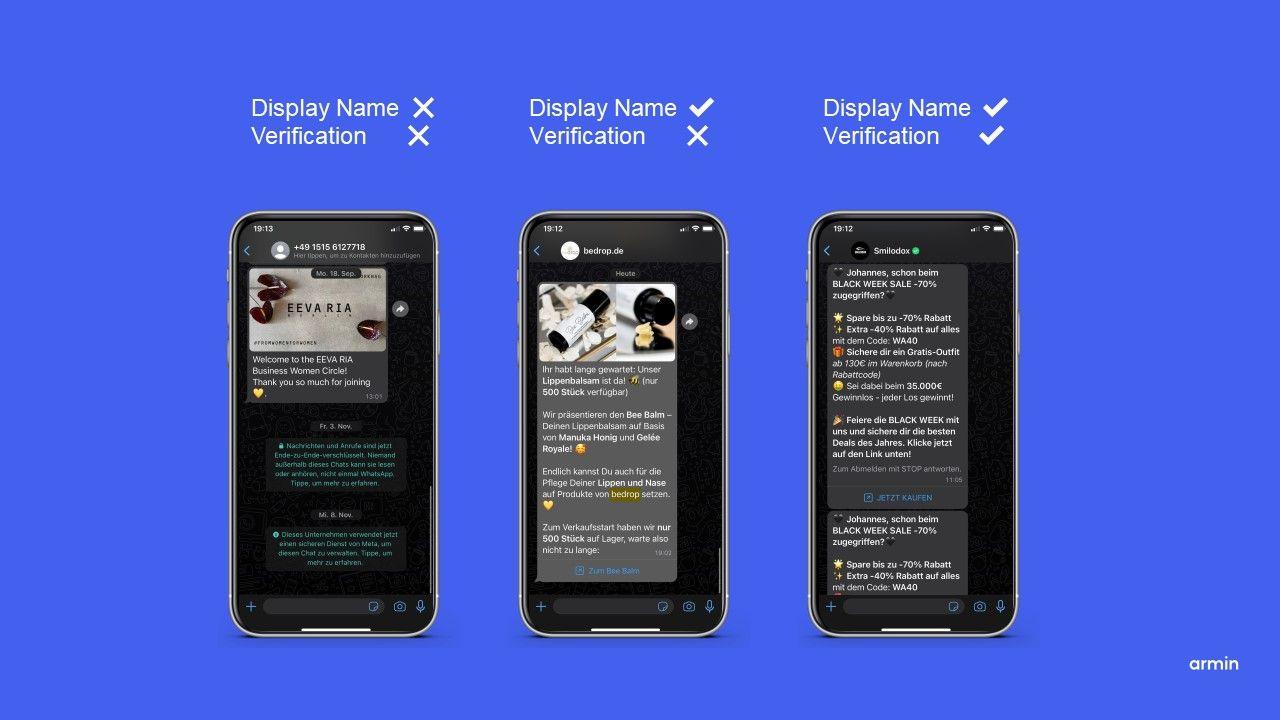
Display name approval – Meta checks if your company name meets their guidelines.
Migrating an existing number?
If you're already using a WhatsApp number (personal or through another provider), you can transfer it via Embedded Signup. The process: disable 2FA on the old number, delete the number from the app, then set it up through your new provider. Your display name and Quality Rating are preserved in most cases.
Webhooks & Templates: The Technical Core Components
This is where most DIY integrations fail. The API alone sends messages – but without the right infrastructure around it, you're flying blind.
Webhooks: Your Real-Time Data Stream
Webhooks are HTTP callbacks that Meta sends to your system whenever something happens: message read, button clicked, reply sent. Without webhooks, no automation.
With webhooks you can:
Write read receipts to your CRM
Track button clicks as events in Klaviyo
Trigger follow-ups when someone doesn't respond
Technical implementation requires an endpoint that processes Meta's requests. Our Chatbot API Guide explains the data flows in detail.
Templates & Pacing: Quality Determines Reach
Marketing messages require Meta-approved Message Templates. These are predefined messages with placeholders for personalized content.
The mechanism most people underestimate: Template Pacing. Meta tests every new template on a small group first (around 1,000 recipients). Only when quality signals look good – few blocks, good engagement – does the campaign roll out to everyone.
A bad template can stall your entire campaign. Your Quality Rating determines how fast and how many messages you can send. Pacing hits especially hard on new templates without history – so plan extra time before running a major campaign.
Pricing Structure: Per-Message Instead of Flat Rate
Since July 2025, Meta no longer charges by 24-hour conversation windows but per message for templates:
Marketing templates (campaigns, promotions): charged per delivered message
Utility templates (order confirmations, shipping updates): often free within the 24h service window
Authentication templates (OTPs, logins): charged, but cheaper than marketing
The 72-hour window for ads – the underrated lever:
When a user starts a chat via a Click-to-WhatsApp Ad (Facebook/Instagram), a 72-hour window opens instead of the usual 24 hours. During this time, you can send marketing templates without Meta charging fees. This is the biggest lever for performance marketing – shifting budget from email to WhatsApp becomes economically attractive.
Service conversations (when the customer messages first) are often free or heavily discounted. Meta wants to encourage good customer service.
MM Lite API: The New Marketing Infrastructure
In April 2025, Meta introduced the Marketing Messages Lite API (MM Lite) – and this is more than a technical detail.
MM Lite uses the same AI that powers Meta's ad system to optimize marketing messages. Instead of sending blindly to everyone, the system prioritizes recipients who are likely to open and click.
What does this mean in practice?
In Meta's own A/B test with 12 million messages (January 2025, India), delivery rates for MM Lite were up to 9% higher than the standard Cloud API. For high-volume campaigns, that's the difference between success and the spam folder.
MM Lite runs parallel to Cloud API: you use Cloud API for service, utility, and authentication – and MM Lite for marketing broadcasts. Same templates, same WABA, no migration required.
Interactive Features: What the API Can Do That the App Can't
The regular WhatsApp Business App knows text and images. The API knows conversion.
WhatsApp Flows: Complete forms directly in the chat. Appointment bookings, lead qualification, surveys – without the customer leaving the app.
Reply Buttons & Lists: Predefined response options instead of free text. This saves users typing time – and that's exactly why these formats achieve significantly higher response and conversion rates than plain text messages. BEMS Home reduced support response time by 40% using this approach.
Multi-Product Messages: Display entire product catalogs in the chat. Browse, select, buy – all in WhatsApp. Smilodox uses this for scaled campaigns.
For those who want to dive deeper into WhatsApp Automation after integration, you'll find use cases for flows, triggers, and automated journeys there.
AI Bots & Compliance 2026
One point many overlook: Meta tightened the rules for AI chatbots in 2026.
The short version: Open-ended AI chats without a clear goal are no longer allowed. Your bot must perform "concrete business tasks" – answer support questions, provide purchase advice, book appointments. General conversation like "I'm your AI friend" violates the guidelines.
This isn't a dealbreaker, but it requires clean prompting and clear guardrails. At Chatarmin, this is built into the flow builder – you define what the bot can do, and we make sure it stays within those boundaries.
Integration Into Your Tech Stack: Where Chatarmin Comes In
You can connect the WhatsApp Business API directly with Meta. Technically possible, practically a multi-month project. You'll need your own webhook infrastructure, template management, contact handling, GDPR-compliant data storage, and connections to Shopify, Klaviyo, your CRM.
This is where most give up – or burn too much money.
Chatarmin isn't a generic chatbot platform. We're a WhatsApp marketing solution built for scale:
Omnichannel Inbox: All conversations in one place, with team assignment and tags
Flow Builder: Drag-and-drop automation without code
Native Integrations: Shopify, Klaviyo, Emarsys – a few clicks, no developer needed
GDPR by Design: EU servers, opt-in management, deletion policies
Cusbclo built structured welcome journeys with the flow builder – from first message to repeat purchase.
ROI logic for your budget: Every automated support request that doesn't need a human agent saves money. The math is simple: automation rate times cost per agent ticket. At 60% automation and 5,000 requests per month, you're quickly looking at five-figure savings.
Frequently Asked Questions About WhatsApp Business API Integration
What's the difference between the WhatsApp Business App and the API?
The app is a standalone solution for small business owners on a phone. The API is an interface for software (like Chatarmin) that enables GDPR compliance, scaling to unlimited users, chatbots, and CRM integrations.
Is the WhatsApp Business API free?
No. There are software fees for the provider (e.g., Chatarmin) plus usage-based costs from Meta for certain template categories (marketing, authentication). Service messages are often free.
What are the requirements for WhatsApp Business API integration?
You need a verified Meta Business Manager, your own phone number (not simultaneously active in the app), and access through a Business Solution Provider (BSP).
Can I use my existing WhatsApp number for the API?
Yes. However, the number must first be deleted from the WhatsApp App. It can then be migrated to the API via "Embedded Signup," with the Quality Rating often preserved.
How long does verification for the WhatsApp Business Account take?
If all documents (business registration, etc.) are ready, Meta verification typically takes 2-5 business days. In some cases, it can take up to 14 days.
What is the 24-hour service window?
A 24-hour period starting from the customer's last message. During this time, you can reply freely (free-form). After that, only approved templates are allowed to re-engage the customer.
Do I need coding skills for the WhatsApp API?
For direct integration ("bare metal"), yes. With a solution like Chatarmin, you use a ready-made interface and flow builder, so no IT skills are required.
Is the WhatsApp Business API GDPR compliant?
Yes, when used correctly through an EU provider like Chatarmin. Unlike the app, the API doesn't read contact books and only processes data after consent (opt-in).
What does Template Pacing mean for WhatsApp campaigns?
A protection mechanism from Meta: New marketing templates are first sent to a small group. Only with positive feedback (few blocks) is the volume automatically scaled up.
How do I get the green checkmark (Green Tick) on WhatsApp?
You need to use the API, have a verified Business Manager, and demonstrate high brand awareness (press coverage, Wikipedia entry). Meta decides on approval individually.
Conclusion: The API Is Powerful – But Not Plug-and-Play
The WhatsApp Business API opens possibilities that are unthinkable with the regular app: real-time data, automation, enterprise-level scaling. But the technical complexity is real – webhooks, templates, pacing, MM Lite, compliance.
You have two options: Build it yourself and iterate for months. Or start with a partner who already has the infrastructure.
Book your personal demo now and let's figure out together how Chatarmin turns your WhatsApp strategy into revenue.