
The Best AI Tools for Customer Service 2026 Compared
Before we dive deep: Here's your overview of the most relevant tools for AI-powered customer service. The table shows where each tool excels – and where it doesn't.
| Tool | Focus | Strength | Limitation |
|---|---|---|---|
| Chatarmin | WhatsApp-First + Omnichannel | Native WhatsApp integration, AI agents with shop connectivity, GDPR-compliant (EU servers) | Primarily optimized for e-commerce & D2C |
| Zendesk | Enterprise Ticketing | Extensive workflows, large ecosystem | Complex, high barrier to entry, pricing difficult for SMBs |
| Gorgias | E-Commerce (Shopify) | Deep Shopify integration, quick setup | Limited outside Shopify, restricted omnichannel capabilities |
| Intercom | SaaS & Conversational AI | Strong in-app communication, lifecycle automation | Gets expensive quickly, less suited for traditional support |
| Freshdesk | Multichannel Ticketing | Solid ticketing, self-service options | AI features less mature than specialized providers |
| Zoho Desk | Omnichannel + Automation | Good price-performance ratio, own AI ("Zia") | UI less modern, integrations sometimes cumbersome |
| Help Scout | Email-based Support | Easy setup, ideal for small teams | Limited automation, no true omnichannel |
| LiveAgent | Multichannel with Phone | Phone, chat, email in one, good SLA features | Interface feels dated, basic AI functions |
| Tidio | Live Chat & Bots | Quick bot integration for smaller shops | Limited scalability, few enterprise features |
| Userlike | Live Chat EU | GDPR-compliant, WhatsApp connection | Focus on chat, less comprehensive support suite |
Bottom line: If WhatsApp is or will become your primary channel, Chatarmin is hard to beat. For pure Shopify shops, Gorgias is an alternative. Enterprise customers with complex workflows often end up with Zendesk – but pay accordingly.
Status Quo: From Automation to Autonomy
In 2025, many companies "tried out" AI in customer service. A chatbot here, an automated email response there. The result: mixed. Some teams report relief, others frustrated customers stuck in bot loops.
The problem wasn't the technology. The problem was the approach.
Most companies treated AI as a better FAQ machine. Keyword detected? Standard response out. That works for "What are your opening hours?" – but not for "My order has been in transit for two weeks, I've written three times, and I'm about to lose my patience."
2026 shifts the focus:
Away from: Automating volume
Toward: Managing complexity
Customers don't just expect fast answers. They expect their issue resolved on first contact. Whether via WhatsApp, email, or chat.
This demands a new category of AI: Agentic AI – AI that doesn't just respond, but acts.
AI Assist vs. AI Agents – What's the Difference?
This distinction isn't marketing speak. It determines whether your AI actually provides relief – or just creates new work.
AI Assist: The Digital Prompter
AI Assist supports your employees. The AI reads incoming messages, summarizes tickets, and suggests responses. The human decides, clicks, adjusts, sends.
Typical functions:
Response suggestions based on context and history
Automatic ticket summaries
Suggested tags and categorization
Knowledge article recommendations from the internal database
Advantage: Your team retains full control. Disadvantage: Every request still requires human interaction. With 500 tickets a day, that provides relief – but no real scaling.
AI Agents: Autonomous Problem Solvers
AI Agents go one step further. They recognize the issue, make decisions, and execute actions – without human intervention.
Example: A customer writes "Where's my order #12345?"
AI Assist shows the employee the order history and suggests a response.
AI Agent checks the shipping status in the shop system, formulates a personalized response with tracking link, and sends it – in seconds.
Another example: A customer wants to return an item.
AI Assist provides the employee with the return form.
AI Agent creates the return label, initiates the refund in the ERP, and confirms receipt to the customer – automatically.
When Do You Need What?
| Situation | Recommendation |
|---|---|
| Small team, few requests (<50/day) | AI Assist often sufficient |
| High volume, repetitive requests | AI Agents for standard cases |
| Complex products, lots of consultation | AI Assist + selective Agents |
| Peak seasons (Black Friday, holidays) | AI Agents essential |
Companies like waterdrop® demonstrate how scalable customer service works with high request volumes: Routine runs automated, the team focuses on cases that deliver real value.
Deep Dive: How AI Intelligently Understands and Routes Tickets
Forget simple if-then rules. "If subject contains 'invoice', then forward to accounting" – that was 2020.
Modern AI systems use Large Language Models (LLMs) that understand context. They don't read keywords. They interpret meaning.
Multi-Class Classification: The Right Team, Instantly
An LLM analyzes incoming messages and assigns them to multiple categories simultaneously:
Topic: Return, invoice, product question, complaint
Urgency: Critical, Normal, Low
Customer type: VIP, new customer, regular customer
Sentiment: Neutral, Frustrated, Angry
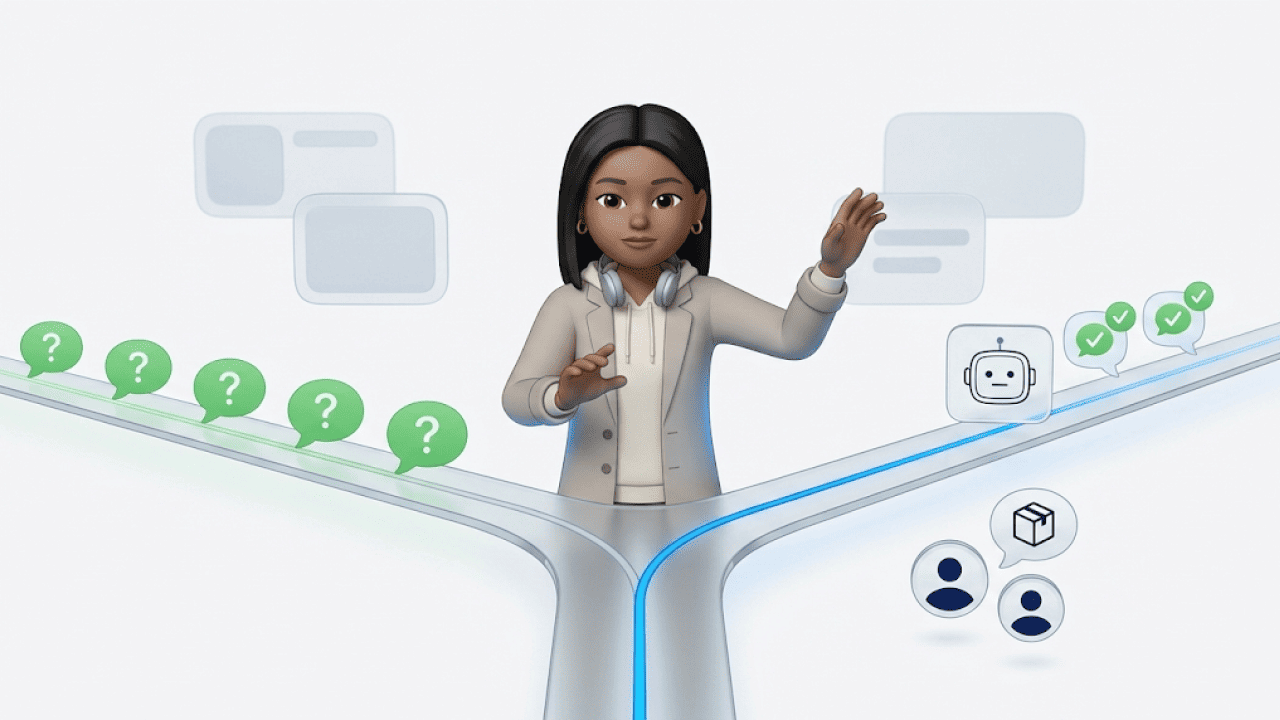
Based on this multi-class classification, the ticket lands directly with the right team:
Critical system error → On-call engineer
VIP customer complaining → Senior customer manager
Standard return question → AI Agent resolves autonomously
This saves not just time. It prevents complex cases from landing with inexperienced employees – and escalating.
Sentiment Analysis: Why Emojis Matter
"Thanks for the quick help!" – positive. "Thanks for the quick help 😡" – sarcasm.
Humans recognize the difference immediately. Simple keyword analysis doesn't. Modern sentiment analysis does – but only with the right technical approach.
How this works technically:
Current systems rely on hybrid models. A pre-trained language model like DistilBERT analyzes the text and captures semantic nuances. In parallel runs a separate emoji sentiment ranking analysis that assigns an emotional value to each emoji.
Why this hybrid approach? Because text and emoji can contradict each other. A 😂 after "My package still hasn't arrived" doesn't signal joy – it signals frustrated resignation. The language model alone would recognize the neutral text. Only the combination with emoji context yields the complete picture.
What AI detects in 2026:
Emoji context: A 😡 after a seemingly positive sentence signals frustration
Tonality: Short, choppy sentences indicate impatience
Irony detection: Laughing emoji with obvious complaint = sarcasm
Escalation patterns: When a customer uses ALL CAPS in the third message, priority increases
The AI calculates a Sentiment Score and acts accordingly:
Score below threshold → Immediate handoff to empathetic employee (Human-in-the-Loop)
Neutral score → AI Agent takes over
Positive score → Opportunity for upselling or feedback request
Brands like PAPER & TEA rely on this combination of automation and human touch – especially with an audience that expects premium service.
Deduplication: No More Duplicate Work
Scenario: A server goes down. Within 30 minutes, 50 customers write "The website won't load" or "I can't access my account".
Without deduplication: 50 tickets land with 50 different employees. Everyone researches the same problem. No one knows the others are also working on it.
With AI deduplication: The AI recognizes the pattern, bundles all 50 requests into one Incident, and links them. One employee handles the issue. Once the problem is solved, all 50 customers automatically receive a personalized message.
How this works technically:
The AI converts each ticket text into an embedding vector – a mathematical representation of meaning. "Server down" and "Page won't load" have completely different words, but their vectors point in a similar direction.
The system calculates the Similarity Score between new tickets and existing incidents. If the score exceeds a threshold (e.g., 0.85), the ticket is automatically assigned to the existing incident.
The advantage: This works language-independently and captures formulations that no keyword matching would ever find. "Nothing works anymore" lands in the same incident as "Website unreachable" – because the semantic meaning is identical.
Result:
Instead of 50 parallel processes: 1 coordinated response
Resources freed for other requests
Consistent communication to all affected customers
The AI Wingman: Why Humans Remain Indispensable
The fear is real: "Will AI replace my job?"
Short answer: No. But it changes it – and differently depending on experience level.
What Research Shows
A Stanford University study (2024) provides a nuanced picture: AI primarily affects entry-level and junior support staff. The reason: The repetitive tasks that juniors normally learn from disappear. Someone who previously answered FAQ tickets for six months to understand the product no longer has that learning curve.
Experienced employees benefit, on the other hand. AI works for them – summaries, context, prepared data. Seniors become more productive, not redundant.
What this means for you:
Companies must now invest in training their juniors. The classic "learning by doing" phase with routine tickets no longer exists. Instead, newcomers need structured training programs to become experts faster – the experts who monitor the AI, train it, and take over complex cases.
This isn't job loss. It's a shift in skill requirements.
The 80/20 Reality
Imagine a support employee answering the same ten questions eight hours a day. Copy-paste. Copy-paste. Copy-paste. That's not just inefficient – it's demotivating. High turnover in support teams isn't without reason.
AI handles this 80% routine:
"Where's my order?"
"How can I reset my password?"
"When will my package arrive?"
The human team handles the 20% that really matter:
Complex complaints involving multiple orders
Emotional situations requiring empathy
Strategic conversations with VIP customers
The effect:
| Before | After |
|---|---|
| 80% routine, 20% challenging | 80% challenging, 20% oversight |
| High turnover | Higher satisfaction |
| Reactive problem-solving | Proactive customer care |
At Bems Home, automating standard flows noticeably relieved the support team – without customers feeling like they're talking to a machine.
AI as Wingman, Not Replacement
A wingman flies beside you. They take on tasks so you can focus on what matters. That's exactly how AI works in customer service 2026:
AI monitors incoming requests and filters routine
AI prepares – summaries, customer history, relevant orders
Human decides on critical cases
AI learns from decisions and improves
This isn't science fiction. It's the model successful support teams are already running.
Data Privacy & Compliance: Not a Nice-to-Have
GDPR compliance isn't an option. It's a requirement.
What to look for when selecting tools:
Server location: EU servers are mandatory. Data flowing to the US is a risk.
Data processing: Is customer data used for AI training? Transparency is crucial.
Role management: Who has access to what data? Audit logs available?
Encryption: End-to-end for sensitive communication
Chatarmin hosts all data on EU servers and is explicitly GDPR-compliant – a point where many US tools show weaknesses.
Voice AI: When the Call Becomes a Ticket
In 2026, the boundary between voicebot and chatbot disappears.
For a long time, phone and chat were separate worlds. The call landed in the call center, the WhatsApp message in the chat tool – different teams, different systems, no shared view of the customer.
That's changing now.
AI phone agents can receive calls, transcribe in real-time, and feed them into the same workflow as a WhatsApp message or email. For your team, a call ticket looks just like a chat ticket – same interface, same prioritization, same AI support.
What this means practically:
A customer calls because their order hasn't arrived
The voice agent captures the issue, checks order status, and provides an answer
If needed, it creates a ticket with full transcription
The ticket lands in the same queue as chat and email requests
An employee can seamlessly follow up via WhatsApp or email
Why this matters in 2026:
Many customers – especially older demographics or for complex issues – still pick up the phone. With Voice AI, you don't lose these customers to a separate system. You integrate them into your AI-powered workflow.
Chatarmin offers exactly this integration with the AI Voice Assistant: voice, chat, and email in one system.
Implementation: How to Start Right
Theory is good. Practice is better. Here's a realistic roadmap:
Phase 1: Pilot (4-6 weeks)
Define channel: Start with one channel – ideally the one with highest volume. For many e-commerce brands, that's WhatsApp.
Select use cases: Begin with 3-5 clearly defined standard requests (order status, returns, FAQ).
Set KPIs: First Response Time, Resolution Rate, CSAT for pilot tickets.
Involve team: Workshops, clear communication, feedback loop.
Phase 2: Scaling (2-3 months)
Expand use cases: Based on pilot learnings, automate additional requests.
Add channels: Email, chat, social media.
Deepen integrations: Shop system, ERP, CRM.
Build reporting: Dashboards for continuous monitoring.
Phase 3: Optimization (ongoing)
Track agent performance: Which requests does AI handle well, which not?
Analyze feedback: Customer satisfaction per channel and request type.
Refine training: Improve AI with new data and edge cases.
BitterLiebe shows how structured customer communication with AI support works in practice – from recurring service touchpoints to CRM integration.
Common Mistakes – And How to Avoid Them
1. Wanting too much at once Start small. One channel, five use cases. Scale after success.
2. Not bringing the team along AI implementation without change management leads to resistance. Communicate early, involve people, demonstrate relief rather than replacement.
3. No clear escalation Define exactly when AI hands off to a human. A customer stuck in a bot loop three times is a lost customer.
4. Ignoring data quality No AI works without clean data. Invest in data quality before investing in tools.
5. Not measuring ROI "Feels faster" isn't enough. Measure First Response Time, tickets per employee, CSAT – before and after.
Conclusion: 2026 Is the Year of Decision
The experimentation phase is over. Companies that strategically deploy AI in customer service now are building a lead that's hard to catch up to.
What you should take away:
AI Agents are the next logical step after AI Assist – if you really want to scale.
Modern AI understands context, sentiment, and patterns. Use this for intelligent routing and deduplication.
Your team isn't being replaced, but upgraded. Routine goes to AI, complex cases go to humans.
GDPR compliance is non-negotiable. Vet every provider.
Next step:
Want to see what Agentic AI looks like in your setup? Not as a PowerPoint, but live with your use cases?
→ Book a demo and walk through individual scenarios.
FAQ: AI in Customer Service 2026
What's the difference between AI Assist and AI Agents?
AI Assist makes suggestions that a human must confirm. AI Agents act autonomously, make decisions, and execute processes (e.g., refunds) independently.
What does a manually processed support ticket cost?
Industry studies (e.g., BARC) show that a manually resolved ticket costs around $20 on average, while AI automation reduces these costs to cents.
Does AI replace customer service employees?
No, AI primarily handles repetitive routine tasks (about 80%). It acts as a "wingman," giving employees more time for complex and emotional cases.
How does AI detect sarcasm in messages?
Through modern hybrid models (like DistilBERT) that combine text analysis with emoji sentiment rankings to understand the emotional context behind the written word.
Is AI in customer service GDPR-compliant?
Yes, when using tools that operate servers in the EU, don't use customer data for training public models without consent, and technically implement deletion concepts (right to be forgotten).
Is AI support worthwhile for small businesses (SMBs)?
Yes, modern SaaS solutions enable setting up AI agents in just a few hours without programming knowledge, saving resources immediately even with lower volume.
What tasks shouldn't be automated?
Highly emotional complaints, complex goodwill decisions outside standard rules, and VIP key account management should continue to receive human empathy.
What does "Human-in-the-Loop" mean?
The concept ensures that AI immediately hands off to a human employee when uncertain or with low sentiment scores (e.g., angry customer).
How does ticket deduplication work with AI?
AI converts ticket content into vectors (embeddings). If these are mathematically very similar, the tickets are recognized as the same incident and bundled.
Why is WhatsApp the most important channel for AI support?
WhatsApp offers the highest open rates and asynchronicity. AI agents can be directly integrated into customers' preferred communication channel.