
In a Nutshell: How Do AI Agents Work?
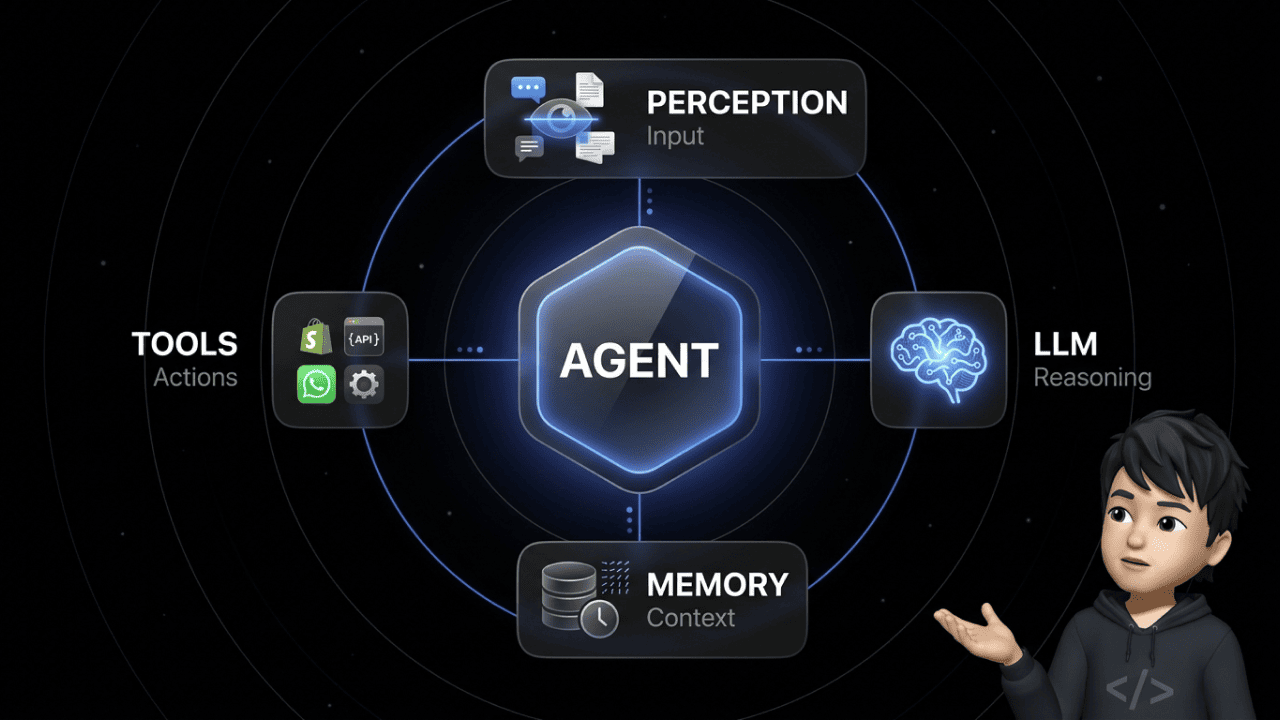
AI agents operate in a continuous loop of perceiving, reasoning, planning, acting, and observing. Unlike chatbots, they autonomously pursue a goal, use external tools like APIs and databases, correct their own mistakes through self-reflection, and improve with every interaction.
Traditional AI vs. Agentic AI: Why the Difference Matters for Your Business
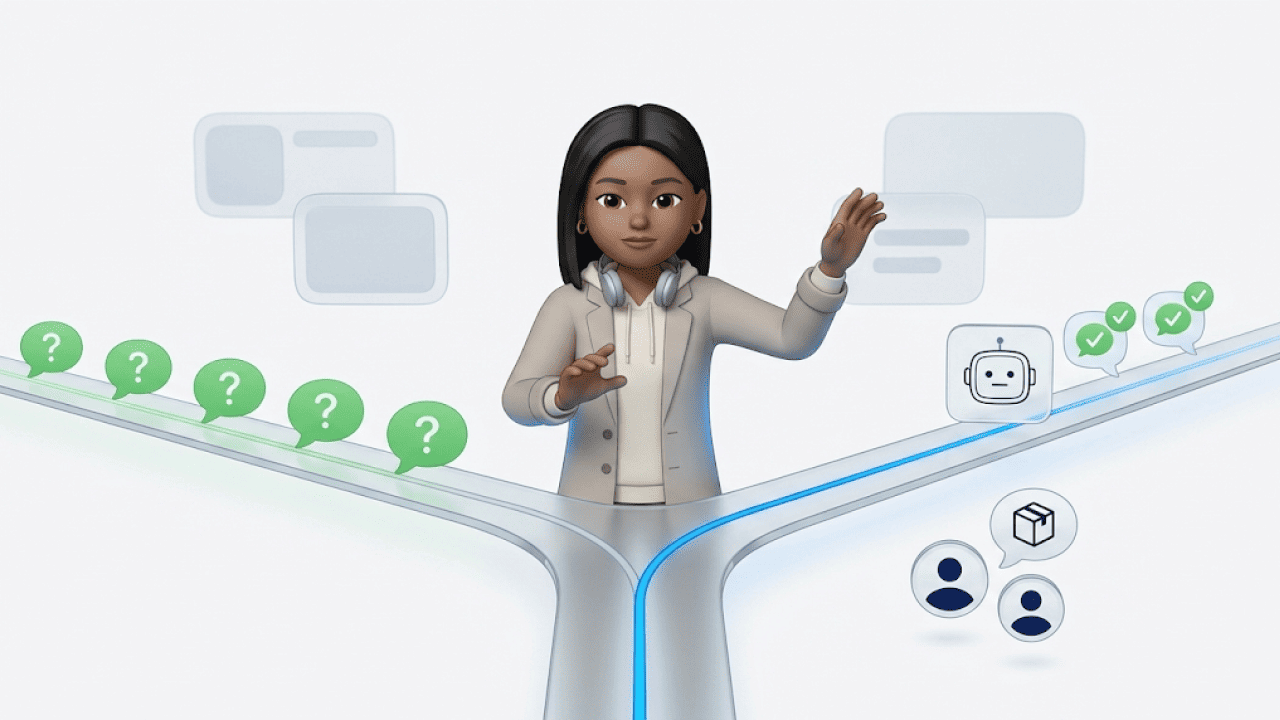
Most "AI tools" on the market are reactive. You enter a prompt, you get a response. No context, no memory, no initiative. That's generative AI — it creates text or images based on a prompt, but it doesn't act.
Agentic AI flips this principle. Instead of waiting for commands, an AI agent acts proactively and goal-oriented: It recognizes what needs to be done, plans the necessary steps, and executes them — including error correction.
Gartner predicts that by 2028, roughly 33% of all enterprise software will integrate agentic AI models. At the same time, an MIT analysis shows that only 5% of enterprise AI solutions make it from pilot to production — often because companies choose reactive chatbot architectures where agentic systems are needed.
| Feature | Generative AI (Chatbot) | Agentic AI (AI Agent) |
|---|---|---|
| Behavior | Reacts to prompt | Autonomously pursues a goal |
| Planning | None | Decomposes tasks into subtasks |
| Memory | Current chat only | Short-term and long-term memory |
| Tools | None (text only) | APIs, databases, web search, UI |
| Error correction | None | Self-reflection and adaptation |
Concrete example: A chatbot answers "Where is my order?" with a generic template. An AI agent recognizes the question, accesses the shop system, checks the shipping status, and responds with the actual tracking number — without any human intervention.
The Agent Loop: How AI Agents Work Step by Step
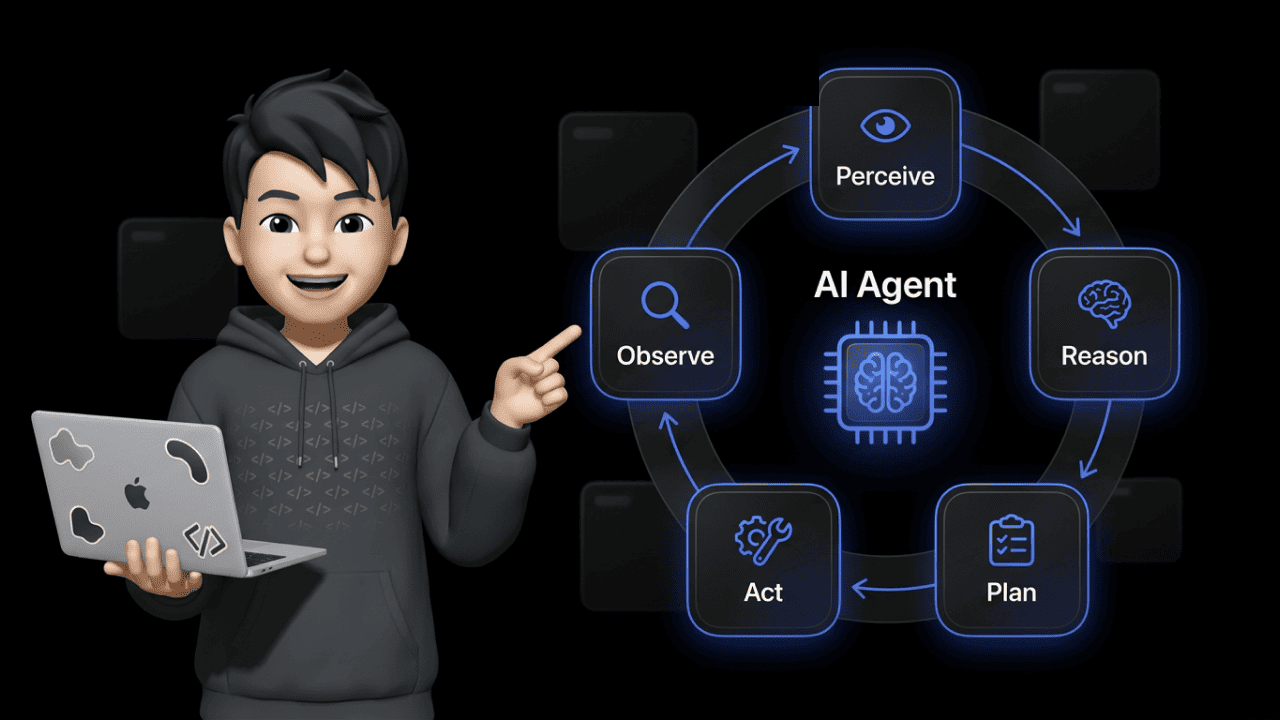
The core of every AI agent is the agent loop — a cycle of five phases that repeats until the result is satisfactory. This principle forms the basis of the ReAct framework (Reasoning + Acting), where the agent observes the result after each action and dynamically adjusts its plan.
1. Perceive (Perception) The agent receives input: a customer message, a shop event, a data point. It analyzes the context and identifies the task.
2. Reason (Reasoning) Based on its LLM core, the agent evaluates the situation, draws conclusions, and decides which strategy makes sense.
3. Plan (Planning) The agent breaks the task into manageable subtasks (task decomposition). First retrieve data, then validate, then respond.
4. Act (Action) The agent uses tools — API calls to your ERP, database queries, email dispatch. It doesn't just generate text, it executes real actions.
5. Observe (Observation) After each action, the agent checks the result. Did the API call work? If not, it loops back to phase 2.
This self-correction is the decisive point. A chatbot gives an answer and moves on — regardless of whether it's right or wrong. An AI agent detects mistakes and corrects course.
Planning: How AI Agents Decompose Complex Tasks
The planning component separates an AI agent from a glorified autocomplete. Three techniques are critical:
Chain of Thought (CoT) — Step-by-Step Reasoning The agent works through a problem sequentially. Each thought builds on the previous one. This drastically reduces errors on complex tasks.
Tree of Thoughts (ToT) — Parallel Solution Paths For tasks with multiple possible solutions, the agent explores different paths simultaneously. It evaluates each branch and picks the most promising one — comparable to a chess player calculating several moves ahead.
Self-Reflection Andrew Ng, one of the most prominent AI researchers globally, calls reflection one of the most important design patterns for autonomous agents. The agent critically evaluates its own results:
- Was the last action successful?
- Did the result move the task closer to the goal?
- What needs to change on the next attempt?
| Technique | How It Works | Use Case |
|---|---|---|
| Chain of Thought | Sequential steps | Standard queries, troubleshooting |
| Tree of Thoughts | Parallel solution paths | Complex decisions with multiple options |
| Self-Reflection | Evaluates own results | Error correction, quality assurance |
Memory: Why AI Agents Don't Start from Scratch
Without memory, every AI agent is just a fancy chatbot. Memory determines whether an agent understands context or asks the same follow-up questions every time.
Short-Term Memory (In-Context Memory)
The LLM's context window — everything the agent "sees" within the current session. Modern models handle 100,000+ tokens. But a bigger window doesn't mean more intelligence — more on that in the Context Rot section below.
Long-Term Memory (External Memory)
The CoALA paper from Princeton University defines three types of long-term memory for AI agents:
- Episodic memory: Recollections of past interactions. "This customer already submitted a return request last week."
- Semantic memory: Factual knowledge about products and policies. "Return window is 30 days, except for sale items."
- Procedural memory: Learned workflows. "For complaints, first check order status, then request photos, then issue a refund."
Vector Databases vs. Graph RAG
Vector databases (Pinecone, Weaviate) excel at semantic similarity search. But they hit limits when the agent needs to understand complex logical relationships across multiple steps. Graph RAG maps entities and relationships explicitly in knowledge graphs. For multi-hop queries — "Which supplier delivers the replacement part for the product that customer X complained about?" — Graph RAG outperforms the vector approach.
Context Rot & Context Compaction: Why More Tokens Don't Mean More Intelligence
100,000 tokens of context window sounds like a free pass. In production, it's a trap.
Context Rot describes the performance degradation of an LLM when working memory gets overloaded with irrelevant information. The model's attention budget is finite — the more noise in the context, the worse the output quality. The NOLIMA benchmark proves this measurably: at 32,000 tokens of context, performance of 11 tested models drops to below 50% of their short-context baseline.
In plain terms: your agent has all the information in the window, but it can't make sense of it anymore. It's drowning in its own history.
The solution: Context Compaction. The agent's history gets actively compressed — irrelevant intermediate steps removed, redundant information consolidated. Anthropic's guide frames the strategy: "Maximize recall (completeness) first so nothing is missed, then iterate on precision to remove unnecessary ballast."
The Agentic Context Engineering (ACE) paper (2025) takes this further: a system of three specialized agents — Generator, Reflector, and Curator — dynamically cleans the context. Result: 10.6% better benchmark performance, without any fine-tuning. Three agents whose sole job is keeping the context clean.
Running AI agents in production without context compaction means paying for tokens that actively degrade your output quality.
Agentic RAG vs. Traditional RAG: The Difference Matters
RAG (Retrieval-Augmented Generation) is the standard for feeding LLMs with external knowledge. But traditional RAG is static: search, retrieve, generate — one pass, done. If the first search returns poor results, the system doesn't notice.
Agentic RAG makes the retrieval process itself agentic. The agent:
- Formulates a search query based on the user's question
- Evaluates the quality of the retrieved documents
- Decides: is this sufficient? Or does the query need to be reformulated?
- Iterates until the information quality meets the threshold
| Feature | Traditional RAG | Agentic RAG |
|---|---|---|
| Search passes | 1 (static) | Multiple (iterative) |
| Quality assessment | None | Agent evaluates relevance |
| Adaptation | None | Query dynamically optimized |
| Result quality | Depends on first hit | Converges to best answer |
Practical example: A customer service agent searches for the return policy on a specific product. Traditional RAG returns the general return policy. Agentic RAG recognizes the answer isn't product-specific enough, reformulates the search, and finds the exception rule for sale items.
Tool Use: API Calls and Computer Use
An LLM can only generate text. Without tools, even the best language model is a glorified text editor. Tool use is what separates "AI-generated text" from "AI that gets things done."
API-Based Tool Use (Function Calling)
The classic approach: the agent recognizes an action is needed, selects the appropriate tool, and formulates a structured API call with the correct parameters.
| Tool | Function | Example |
|---|---|---|
| Shop API (Shopify, WooCommerce, BigCommerce) | Orders, returns | Retrieve shipping status |
| ERP system (NetSuite, SAP Business One) | Inventory, invoices | Issue a refund |
| CRM database | Customer history | Check customer lifetime value |
| Email / messaging API | Communication | Send shipping confirmation |
UI-Based Tool Use (Computer Use)
Not every system has an API. Increasingly, AI agents can also operate user interfaces directly — so-called computer use. The agent recognizes screen elements, simulates mouse clicks, and performs keyboard inputs like a human user.
This is relevant for legacy systems that don't offer modern API interfaces. Instead of waiting for an API integration, the agent navigates the software through the UI.
But be careful: The OWASP Top 10 for LLMs explicitly warns about Excessive Agency — the risk of agents having overly broad permissions without human oversight. Anyone deploying AI agents in production needs clear permission boundaries and human-in-the-loop approvals for critical actions.
Infinite Loops & Cost Control: How to Prevent Your Agent from Burning Money
Picture this: your agent gets stuck in a loop, calls the same API for hours, and burns several hundred dollars in token costs at 3 AM before anyone notices. Not a hypothetical — this happens in production.
Simple iteration limits (hard limits) aren't enough. They stop the agent after N iterations, but they can't tell whether the agent is actually stuck or just carefully working through a complex task. With expensive API calls (GPT-4 class), the damage can hit three figures within minutes.
The solution: State-Level Circuit Breakers. Here's how they work:
- After each step, the agent's execution state is captured via a hash value
- The system compares the current hash against previous states
- If an identical state repeats within 30 seconds, the circuit breaker triggers and stops the agent immediately
- Additionally: token budgets per task and prompt caching to avoid redundant LLM calls
| Safeguard | Function | Limitation |
|---|---|---|
| Hard limit | Stops after N iterations | Can't distinguish progress from loop |
| Token budget | Cost ceiling per task | Also stops productive agents |
| Circuit breaker | Detects identical states | Requires clean state serialization |
| Human-in-the-loop | Human approves critical actions | Latency, not 24/7 available |
In practice, you combine all four. A single mechanism isn't enough.
Evaluation & Observability: Testing Agents Is Incredibly Hard
Building an AI agent is one thing. Knowing whether it actually works is another thing entirely.
The problem: an agent has no deterministic output. The same input can lead to different toolchains, different intermediate steps, and different results. Classical unit tests don't cut it.
Two levels of evaluation are required:
Step-Level Tracing — Did the agent call the right tools in the right order? Was the API addressed correctly? How many tokens did each step consume? This is about the path, not the destination.
Outcome Scoring — Did the agent actually solve the customer's problem? You measure this either through AI judges (a second model evaluates response quality) or through human review. This is about the result, not the path.
Tools like LangSmith, Langfuse, or Maxim provide the necessary observability: traces per agent run, cost breakdowns per step, latency metrics, and quality scores. Without this infrastructure, you're flying blind — and flying blind with a system that autonomously triggers API calls and processes customer data is not an option.
For e-commerce specifically: If your AI agent processes a cancellation, you need to trace which data it checked, why it made the decision, and whether the outcome was correct. Tracing isn't a nice-to-have — it's mandatory.
The 5 Types of AI Agents: From Simple to Autonomous
Not every AI agent is built the same. The classification determines what an agent can do — and what it can't.
1. Simple Reflex Agents Strictly rule-based: if condition X, then action Y. No memory, no planning. Example: spam filter.
2. Model-Based Reflex Agents Like type 1, but with an internal world model. They factor in past states. Example: thermostat with trend analysis.
3. Goal-Based Agents Have a defined goal and plan actions ahead. Example: navigation agent using traffic data.
4. Utility-Based Agents Compare different solution paths and optimize for maximum utility. Example: pricing agent that balances conversion and margin.
5. Learning Agents Continuously adapt their behavior through feedback. Every interaction improves them. Example: customer service agent that learns from escalations.
| Type | Memory | Planning | Learning | Example |
|---|---|---|---|---|
| Simple Reflex | No | No | No | Spam filter |
| Model-Based Reflex | Yes (internal) | No | No | Thermostat |
| Goal-Based | Yes | Yes | No | Navigation |
| Utility-Based | Yes | Yes (optimized) | No | Dynamic pricing |
| Learning | Yes | Yes | Yes | AI customer service (e.g. armincx) |
For e-commerce, learning agents are the relevant standard. Anything below is too rigid for returns management, lead qualification, or support automation.
Multi-Agent Systems: When One Agent Isn't Enough
Complex business processes rarely fit into a single agent. In multi-agent systems (MAS), multiple specialized agents collaborate — each with a clearly defined role.
The Six Orchestration Patterns
Sequential (Pipeline): Agent A completes its part and hands off to Agent B. Example: classification → data retrieval → response formulation.
Parallel (Concurrent): Multiple agents work simultaneously. A synthesizer consolidates the results.
Orchestrator-Worker: A manager agent dynamically distributes tasks to specialized sub-agents.
Group Chat / Debate: Agents discuss solutions and critique each other. Used for decisions with no clear-cut answer.
Blackboard: Agents don't communicate directly. Instead, they share findings asynchronously via a shared knowledge base. Each agent reads, processes, and writes back — without waiting for the others. Ideal for systems where agents work independently at different speeds.
Magentic-One: A manager agent dynamically creates a task ledger, while specialized agents iteratively work through the tasks. The manager updates the ledger after each step and distributes new tasks based on prior results.
| Pattern | Communication | Speed | Use Case |
|---|---|---|---|
| Sequential | Linear | Medium | Standard processes |
| Parallel | Via synthesizer | High | Research, data reconciliation |
| Orchestrator-Worker | Hub-and-spoke | Medium | Enterprise workflows |
| Group Chat | All-to-all | Low | Strategic decisions |
| Blackboard | Async via DB | High | Independent subtasks |
| Magentic-One | Via task ledger | Medium | Dynamic, evolving tasks |
The Most Important Frameworks for AI Agents Compared
Anyone building or evaluating AI agents will encounter three dominant frameworks. Each solves a different problem — and the choice has consequences.
A number that underscores this: according to a Cleanlab study (2025), 70% of regulated enterprise companies rebuild their AI agent stack every three months because the technology evolves that fast. Framework decisions aren't one-time choices — they're an ongoing process.
LangGraph (by LangChain) Builds agents as state graphs — each node is a step, each edge is a decision. Maximum control over the workflow. Trade-off: steep learning curve.
CrewAI Focuses on role-based agent teams. You define agents with clear roles (Researcher, Writer, Reviewer) and let them collaborate. Trade-off: less control over the exact workflow.
Microsoft AutoGen Based on conversation-driven collaboration: agents communicate in natural language. Trade-off: higher token consumption due to conversations.
| Framework | Strength | Ideal For | Trade-off |
|---|---|---|---|
| LangGraph | Control via state graphs | Complex conditional workflows | Steep learning curve |
| CrewAI | Role-based teams | Content pipelines, division of labor | Less workflow control |
| AutoGen | Conversation-driven | Discussion, iterative problem-solving | High token consumption |
For e-commerce decision-makers: You don't need to deploy these frameworks yourself. But you should know what your provider builds on — and whether the architecture fits your use cases. Platforms like Chatarmin build armincx on a proprietary workflow engine that doesn't just plan cancellations, address changes, and returns — it actually executes them.
Frequently Asked Questions (FAQ)
What is the difference between RAG and Agentic RAG?
Traditional RAG retrieves information in a single pass, while Agentic RAG iteratively analyzes and evaluates search results and autonomously adjusts queries when needed.
What frameworks exist for building AI agents?
The most well-known frameworks are LangGraph for controllable state graphs, CrewAI for role-based agent teams, and AutoGen for conversation-driven multi-agent systems.
What is Tool Calling in AI agents?
Tool Calling (or Function Calling) is an AI agent's ability to independently invoke external tools like APIs, databases, or web searches to perform real-world actions.
Can AI agents operate user interfaces?
Yes, through UI-based tooling (Computer Use), agents can recognize screen elements, simulate mouse clicks, and perform keyboard inputs like a human user.
How do AI agents store long-term information?
AI agents use vector databases for semantic similarity searches and increasingly Graph RAG (knowledge graphs) to store complex logical relationships across multiple sessions.
What is a multi-agent system (MAS)?
In a multi-agent system, multiple specialized AI agents work collaboratively to solve complex tasks that would be too extensive for a single agent.
What does "Excessive Agency" mean in artificial intelligence?
According to the OWASP guidelines, Excessive Agency describes the security risk when an AI agent has overly broad permissions and executes actions without sufficient human oversight.
What is the ReAct approach in AI agents?
The ReAct framework combines Reasoning and Acting, so the agent observes the result after each action and dynamically adjusts its subsequent plan.
What is the difference between Generative AI and Agentic AI?
Generative AI merely creates text or images based on a prompt, while Agentic AI proactively pursues goals, plans, and autonomously executes tasks in the real world.
How do AI agents prevent infinite loops?
To avoid infinite loops, developers use hard limits on iterations, token budgets, and human-in-the-loop approvals where critical actions require human authorization.
What is "Context Rot" in AI agents?
Context Rot describes the massive performance degradation of an LLM when working memory gets overloaded with too much irrelevant information and long token chains.
How do companies prevent AI agents from burning excessive API costs?
To stop expensive infinite loops, developers use state-level circuit breakers that monitor execution state and abort on repetition, combined with prompt caching.
What is the Blackboard pattern in AI agents?
In the Blackboard pattern, agents don't communicate directly with each other but share their findings and intermediate results asynchronously via a centralized, shared knowledge base.
How do you test and evaluate AI agents in production?
Evaluation happens on two levels: through step-level tracing (monitoring tool usage and individual steps) and outcome scoring, where AI judges or humans verify whether the final business objective was achieved.
What does Agentic Context Engineering (ACE) mean?
ACE is a method where a collaborative agent team (consisting of Generator, Reflector, and Curator) dynamically cleans and optimizes context to prevent information loss.
Conclusion: AI Agents Are Infrastructure — But Only with the Right Architecture
The technology behind AI agents is clear: agent loop, planning with reflection, long-term memory, tool use, agentic RAG. Understanding these components lets you separate vendor promises from reality.
But the tech alone isn't enough. Production brings problems no demo video shows: context rot, infinite loops, missing observability, excessive agency. According to MIT, 95% of AI projects fail on the path to production. According to Cleanlab, 70% of enterprises rebuild their agent stack quarterly.
Taking AI agents seriously means implementing circuit breakers, context compaction, step-level tracing, and clear permission boundaries. Everything else is an expensive experiment.
For e-commerce companies: platforms like Chatarmin solve exactly these challenges with armincx — an AI agent that automates 70–80% of support tickets in production, with the right guardrails in place.
Want to see how this works in practice? 👉 Book a free demo