DSGVO-konform
5-Min-Setup
ISO 27001
Make marketing data visible in support tickets. armincx uses Omnisend segments, email histories, and customer data to resolve support inquiries faster and with more context.


































Quick check for decision makers
Marketing data directly in AI customer service.
Segments, campaign history, and customer status flow automatically from Omnisend into armincx. The AI sees the full marketing context.
Omnisend segments (VIP, first-time buyer, inactive), campaign history (which emails received, opened, clicked), tags, custom properties, and contact data. Sync runs in real time. New segments in Omnisend automatically appear in armincx.
The AI uses Omnisend data for VIP routing, personalized responses, and automatic prioritization of support tickets.
Omnisend marks a customer as VIP (lifetime value over 500 EUR, 10+ orders). This customer opens a support ticket. armincx automatically recognizes the VIP status and prioritizes the ticket. The AI response is more personally worded. On escalation the customer is routed directly to a senior agent.
Email, WhatsApp, Instagram, Facebook, live chat in one inbox. Marketing context from Omnisend visible directly in the ticket.
Without Omnisend integration the support team only sees the inquiry, not the marketing context. With integration the AI sees: which campaign did the customer last receive? Did they open the email? Are they in a discount segment? This information improves response quality and enables personalized reactions.
Omnisend is the email and SMS marketing platform that drives most customer communication at many Shopify and WooCommerce shops. armincx connects natively with Omnisend and makes this marketing data visible in support.
That means: when a customer opens a support ticket, the armincx AI immediately sees the full marketing context. Which Omnisend segment does the customer belong to? Are they VIP, first-time buyer, or inactive? Did they open the last newsletter? Which campaigns have they received?
This context fundamentally changes support response quality. A VIP customer with 20 orders gets a different response than a first-time buyer. The AI makes this distinction automatically, based on Omnisend data.
armincx uses Omnisend data on three levels:
This data enrichment works in addition to shop-based AI actions. If you also connect Shopify or WooCommerce with armincx, the AI has access to order data and marketing data simultaneously.
E-commerce shops using Omnisend for marketing that want to automate customer service with armincx. Three profiles come up most frequently:
Chatarmin is one of the few AI customer service providers with a native Omnisend integration. The largest competitor in the DACH region does not offer an Omnisend connection.
AI pulls status and tracking from Shopify/WooCommerce and enriches the response with Omnisend context. VIP customers receive prioritized responses.

AI recognizes return intent, checks the order in the shop, and initiates the process. Sentiment data flows back to Omnisend.
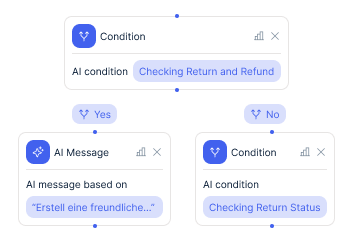
AI finds the invoice in the shop system and sends it to the customer as an attachment. Via email or WhatsApp.
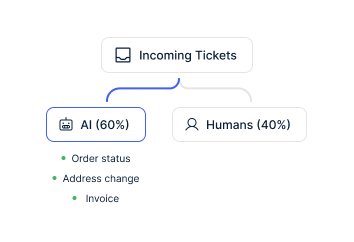
The Omnisend integration complements the shop integration. Order status, returns, cancellations, and invoices run through the Shopify or WooCommerce connection. Omnisend enriches these tickets with marketing context.
An example: customer asks about order status. armincx pulls the status from Shopify and simultaneously sees in Omnisend that the customer is VIP and received a flash sale email yesterday. The response includes the tracking link and a reference to the special offer. Personalized, context-rich, automatic.
For complex cases the AI creates a draft that an agent can approve. The agent sees the full Omnisend history in the ticket without switching tools.
The connection between Omnisend and armincx runs in both directions. Omnisend segments and tags are visible in armincx. In return, armincx writes support tags and sentiment data back into Omnisend profiles.
This enables data-driven marketing decisions based on support interactions. Customers with open complaints are automatically excluded from aggressive campaigns. Customers who rated positively in support receive a review request.


Disclaimer: All data conducted from over 50+ Sales Calls with DACH Ecom Owners
armincx works with a flat rate. No costs per agent seat and no costs per ticket. The connection between Omnisend and armincx incurs no additional integration costs.
You need an active Omnisend account and an armincx account. For the full AI customer service experience we recommend additionally connecting a shop (Shopify or WooCommerce) so the AI has both marketing and order data. Exact armincx pricing is discussed in a personal conversation.
What leading E-Commerce brands from the DACH region say about armincx
Swen Pristat
paigh

“I think Chatarmin offers a huge advantage for any online business.”
Florian Bein
bedrop

“Very satisfied with Chatarmin – great IT team!”
Oguzhan Soylu
Bems Home

“Effective CRM upgrade through features and top-notch support.”
paigh
“I think Chatarmin offers a huge advantage for any online business.”
bedrop
“Very satisfied with Chatarmin – great IT team!”
Bems Home
“Effective CRM upgrade through features and top-notch support.”

Create an armincx account and connect support channels.

Add the API key from Omnisend. Segments and data sync automatically.

Activate VIP routing and sentiment sync. Marketing context visible in tickets.
Create an armincx account and connect support channels.
Add the API key from Omnisend. Segments and data sync automatically.
Activate VIP routing and sentiment sync. Marketing context visible in tickets.
The Omnisend integration setup takes under 10 minutes:
Chatarmin offers personal onboarding. For agency clients there is accelerated onboarding: set up multiple shops in parallel, central management.
armincx hosts all data on servers in Germany. Omnisend stores data in the EU and is GDPR-compliant. The combination creates a fully EU-based stack: email and SMS via Omnisend (EU), support via armincx (Germany), WhatsApp via the official Meta API.
For DACH merchants with data privacy requirements this is a relevant advantage. A Data Processing Agreement (DPA) is available.

The deepest shop integration for armincx. Order data and AI actions directly in Shopify. Complements the Omnisend data enrichment.

ERP integration for DACH merchants. armincx combines JTL order data with Omnisend marketing context in support.

Cloud ERP for scale-ups. armincx connects Xentral order data with Omnisend segments for context-rich AI support.
Everything you need to know about the Omnisend armincx integration.
Yes. armincx connects natively via the Omnisend API. All segments, tags, and campaign data sync automatically. Chatarmin is one of the few AI customer service providers with a native Omnisend integration. The largest competitor in the DACH region does not offer a connection.
armincx works with a flat rate. No costs per seat or ticket. The Omnisend connection incurs no additional costs. For the full AI support experience we recommend additionally connecting a shop (Shopify or WooCommerce). Exact pricing is discussed in a personal conversation.
The technical setup of the Omnisend integration takes under 10 minutes. Full onboarding with workflow configuration, VIP routing, and knowledge base typically takes 1-2 weeks. Our solution engineering team guides the entire process.
Yes. armincx hosts all data on servers in Germany. Omnisend stores data in the EU. The combination creates a fully EU-based stack. A Data Processing Agreement (DPA) is available.
Ticket history from existing tools (Zendesk, Gorgias, Freshdesk) is not automatically imported. Customer history remains in Shopify/WooCommerce and Omnisend and is available to the AI from day one. Existing macros and text templates can be imported as knowledge base content into armincx.
