GDPR-Compliant
ISO 27001
Tickets in Greyhound
Chatarmin brings WhatsApp into your helpdesk: your customers' messages arrive in Greyhound as tickets, much like email tickets. The note "WhatsApp" shows your team which channel a ticket came through.


































The quick check for decision makers
Greyhound stays your team's helpdesk. Chatarmin adds WhatsApp messages as tickets.
Your customers' WhatsApp messages arrive in Greyhound as tickets, much like email tickets.
WhatsApp requests sit where your team also sees its email tickets. The helpdesk stays the same, and WhatsApp joins as another source of tickets.
WhatsApp tickets get the note "WhatsApp". This lets your team tell them apart from email tickets.
WhatsApp tickets look similar to email tickets. The note is the marker that shows your team which channel a request came through.
We set up the connection between Chatarmin and Greyhound together with you.
We work out with you what the connection needs and how WhatsApp tickets fit into your existing workflows in Greyhound.
Greyhound is your support team's helpdesk. Chatarmin connects WhatsApp to it: your customers' messages arrive in Greyhound as tickets, much like email tickets. Greyhound is now offered by JTL under the name "Customer Service powered by GREYHOUND".
WhatsApp tickets get the note "WhatsApp". It shows your team whether a request came in via WhatsApp or via email.
We set up the connection together with you. We work out with you what it needs and how the WhatsApp tickets fit into your workflows in Greyhound.
You can find more on the Greyhound integration in our Help Center.
Three moments from everyday support, from the WhatsApp message to the ticket in Greyhound.
A customer writes on WhatsApp. Her message arrives in Greyhound as a ticket, much like an email ticket.
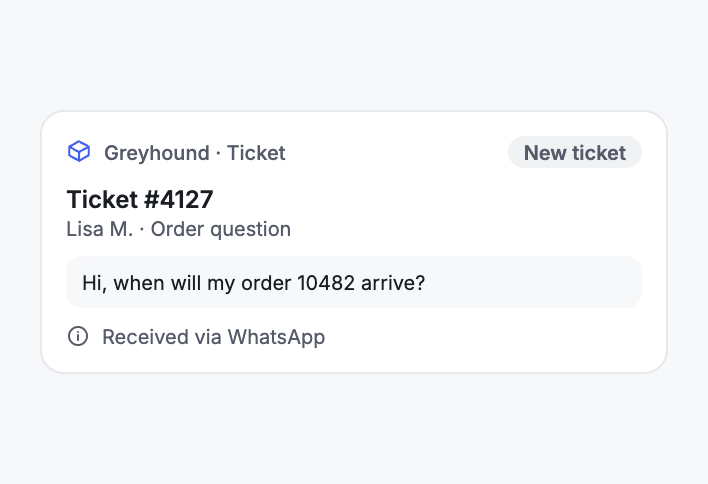
The ticket carries the note "WhatsApp". Your team uses it to tell WhatsApp tickets apart from email tickets.
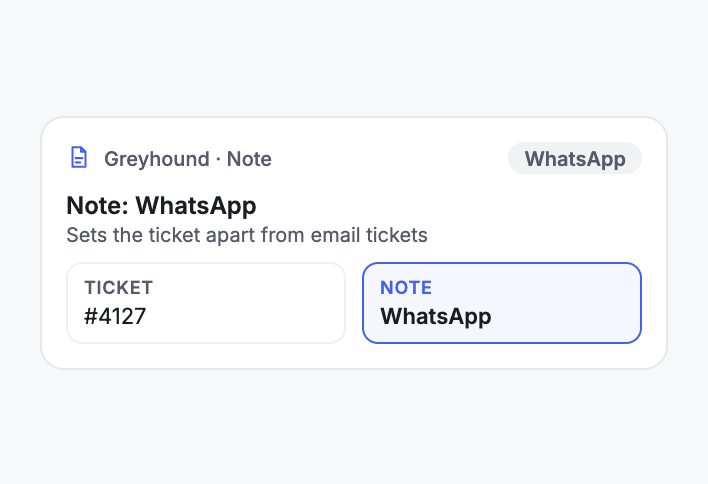
WhatsApp tickets arrive in Greyhound, where your team also sees its email tickets.
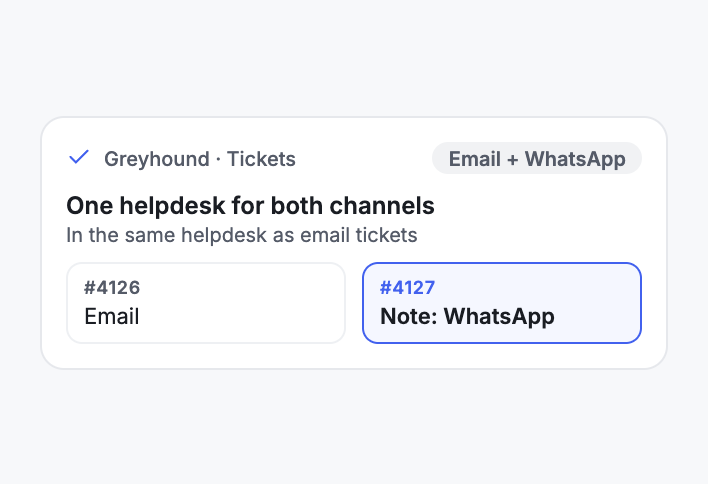
With Chatarmin, WhatsApp messages arrive in Greyhound as tickets, much like email tickets. The requests sit where your team works anyway.
When two channels land in the same helpdesk, your team needs to tell them apart. That is why WhatsApp tickets get the note "WhatsApp". Whoever opens a ticket can see from it that the request came in via WhatsApp.


Disclaimer: All data conducted from over 50+ Sales Calls with DACH Ecom Owners
The integration fits e-commerce teams whose support works in Greyhound and who want to see WhatsApp requests where their email tickets already are.
Your team knows Greyhound and handles tickets there every day. With Chatarmin, WhatsApp requests arrive as tickets in the same helpdesk, marked with the note "WhatsApp".
Chatarmin is an official Meta Business Partner, certified to ISO 27001, GDPR-compliant and hosted on servers in Europe. More than 500 brands use Chatarmin.
What leading E-Commerce brands from the DACH region say about armincx
Jakob Graf
HANS Brainfood

“Easy integration with Shopify and Klaviyo, simple setup of all technical aspects. Direct customer reach with open rates over 85% and amazing ROI on WhatsApp costs. Perfect for top customers and as an exclusive sales element.”
Victor Horst
cusbclo

“If you’re not using WhatsApp marketing yet, go to Chatarmin.”
Lisa Straube
BitterLiebe

“I would recommend other companies to try WhatsApp marketing as well and implement it with Chatarmin.”
Matthias Leibitz
T1TAN

“Top tool. Integrates into our entire tech stack.”
HANS Brainfood
“Easy integration with Shopify and Klaviyo, simple setup of all technical aspects. Direct customer reach with open rates over 85% and amazing ROI on WhatsApp costs. Perfect for top customers and as an exclusive sales element.”
cusbclo
“If you’re not using WhatsApp marketing yet, go to Chatarmin.”
BitterLiebe
“I would recommend other companies to try WhatsApp marketing as well and implement it with Chatarmin.”
T1TAN
“Top tool. Integrates into our entire tech stack.”
Together with our team, from the first call to the first ticket.

You show us how your team works in Greyhound today. Together we work out what the connection needs.
We set up the connection between Chatarmin and Greyhound together with you.
The first WhatsApp messages arrive in Greyhound as tickets with the note "WhatsApp". Together we check that everything fits.
You show us how your team works in Greyhound today. Together we work out what the connection needs.
We set up the connection between Chatarmin and Greyhound together with you.
The first WhatsApp messages arrive in Greyhound as tickets with the note "WhatsApp". Together we check that everything fits.
Meta charges for every message. A marketing message costs €0.1131 in Germany, so around 11 cents per marketing message. In Austria and Switzerland it is €0.0490, around 5 cents. A utility message costs €0.0456 in Germany. Since 1 October 2026, service messages cost money too, also €0.0456 in Germany. These figures are based on the Meta rate card valid since 1 July 2026.
The connection to Greyhound is part of your Chatarmin setup. What Chatarmin costs depends on your volume. In a call we walk you through the numbers based on your message volume and your workflows.
Everything worth knowing about the integration.
Your customers' WhatsApp messages arrive in Greyhound as tickets, much like email tickets. To tell them apart, they get the note "WhatsApp".
By the note "WhatsApp" on the ticket. This lets your team tell them apart from email tickets.
Much like an email ticket. It also carries the note "WhatsApp", so your team can tell which channel it came through.
Together with our team. We work out with you what the connection needs and set it up with you.
Yes. The Help Center has its own section on the Greyhound integration, and you set up the connection together with our team.
For e-commerce teams whose support works in Greyhound. They see WhatsApp requests where their email tickets already are.
Yes. Chatarmin is certified to ISO 27001 and hosted on servers in Europe.
Meta charges around 11 cents per marketing message in Germany and around 5 cents in Austria and Switzerland. Since 1 October 2026, service messages cost money too, €0.0456 in Germany.
No. The integration belongs to Chatarmin for WhatsApp marketing, while armincx by Chatarmin is our AI customer service with its own omnichannel inbox and its own integrations.

We look at your setup and show you what WhatsApp tickets in Greyhound look like for your team. 15 minutes, free of charge.