GDPR-Compliant
ISO 27001
Read-Only Access
armincx by Chatarmin shows your customers' GoKarla orders in the ticket, with every shipment, carrier, status and tracking link. Your team and the AI agent answer tracking questions without switching tools. Nothing is changed in GoKarla.


































Quick check for decision makers
Find the order, match the parcel, send the link: with GoKarla in armincx it's all in the ticket, and the AI agent looks up orders and shipments directly.
If the contact's email address matches orders in GoKarla, the customer panel shows those orders with the status from the latest tracking event.
Each order shows the order number, total, order date, status and shipping address. The order number links to the GoKarla tracking page. Below are the products with title, quantity, price, SKU and image.
If an order ships in several parcels, armincx shows one card per shipment with carrier, status, tracking number and tracking link.
If only part of the order arrives, your team sees straight away which shipment is still on its way and with which carrier. It sends the matching tracking link right away.
armincx reads orders and shipments from GoKarla but doesn't change anything there. Neither your team nor the AI agent can overwrite anything in GoKarla.
The agent looks up an order by order number or a shipment by tracking number. If neither is available, you tell it to ask the customer.
The armincx GoKarla integration brings orders and shipments from GoKarla into the ticket, with carrier, status and tracking link per parcel. GoKarla is an order tracking platform that helps shops keep track of the shipping status of their orders.
You need three values from your GoKarla account:
If you don't have them, your GoKarla contact can provide them. Under Integrations, select GoKarla, enter the three values and connect. armincx doesn't test the credentials when saving. So open a ticket straight away from a customer with a GoKarla order and check that it appears.
Matching uses email addresses only. armincx searches the contact's main address and all additional addresses and shows each order once. The customer panel doesn't use phone numbers or order numbers.
| Situation | What you see |
|---|---|
| GoKarla not connected | no GoKarla section |
| Contact without an email address | no orders, add an email address |
| Email address without orders | a note that there are no GoKarla orders |
| Ordered with a different email address | no match, add the order address to the contact |
Your AI agents get two read actions:
Both actions can be set to require approval by your team. You also choose which GoKarla connections the agent may use.
You'll find the step-by-step guide in our documentation.
The customer gives their order or tracking number. The AI agent looks up the order or shipment in GoKarla and replies with the current status.

Your team sees every shipment of the order as its own card and explains which parcel is still on its way.

Your team adds the order address to the contact. armincx searches all addresses and shows the order in the ticket.

"Where is my order?", WISMO for short in e-commerce, is a question with a clear answer: the current status of the shipment. Because the GoKarla integration is read-only, the AI agent can give that answer without anything being changed in GoKarla.
How to set it up:
If an order ships in two or more parcels, customers often ask about the missing part. With one card per shipment, your team sees straight away which parcel has arrived and which is still on its way. The products of the order are listed below with image and SKU.
armincx finds orders via all of a contact's email addresses. If a customer writes from their private address but ordered with their work address, your team adds the order address as an additional email address on the contact. The orders then appear, and the existing address stays in place.
The workflow with armincx compared with GoKarla and the inbox used separately.

Disclaimer: All data conducted from over 50+ Sales Calls with DACH Ecom Owners
The integration is built for shops that track their shipments in GoKarla and handle customer service with armincx.
The AI agent answers "When will my parcel arrive?" with the current status from GoKarla. Your team focuses on parcels that are really stuck.
Every shipment shows its carrier. Your team doesn't have to work out first which carrier to check.
armincx searches all of a contact's email addresses. One added address is enough for the orders to show up in the ticket.
What leading e-commerce brands from the DACH region say about armincx.
Tobias J.
Braun Büffel

“Intuitive to use and quick in support.”
Dominik Englputzeder
myHarry

“To be honest, we are very excited about the tool. It is exactly what we need.”
Matthias Leibitz
T1TAN

“Top tool. Integrates into our entire tech stack.”
Eren Karacabay
vitabay

“Finally, an AI that doesn’t hallucinate.”
Braun Büffel
“Intuitive to use and quick in support.”
myHarry
“To be honest, we are very excited about the tool. It is exactly what we need.”
T1TAN
“Top tool. Integrates into our entire tech stack.”
vitabay
“Finally, an AI that doesn’t hallucinate.”
Get the username, API key and shop slug from your GoKarla account or your GoKarla contact.

Under Integrations, select GoKarla, enter the three values and then check a real ticket.
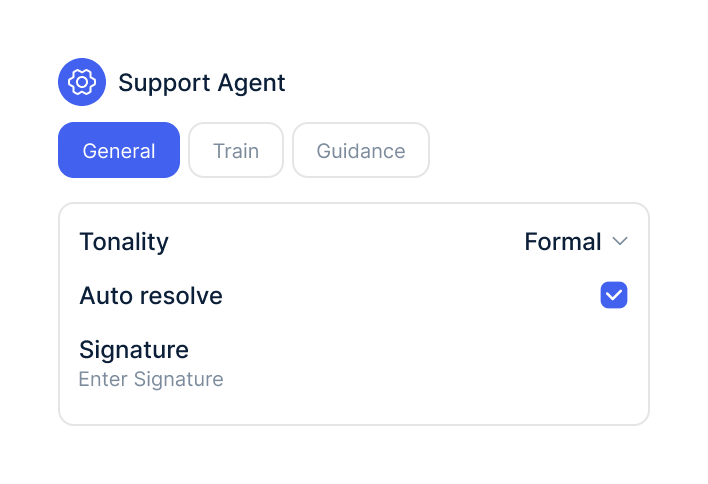
In your AI agents, switch on the GoKarla lookups and choose which connections the agent may use.
Get the username, API key and shop slug from your GoKarla account or your GoKarla contact.
Under Integrations, select GoKarla, enter the three values and then check a real ticket.
In your AI agents, switch on the GoKarla lookups and choose which connections the agent may use.
The GoKarla integration is part of armincx. To connect, you need a GoKarla account with a username, API key and shop slug.
What armincx costs for your team depends on your ticket volume and the channels you use. In a call, we'll work through your setup with you.
These tools complement GoKarla in customer service.
Everything you need to know.
The username, API key and shop slug from your GoKarla account. If you don't have them, your GoKarla contact can provide them.
No. The integration only reads orders and shipments.
Via the contact's email addresses, meaning the main address and all additional ones. The customer panel doesn't use phone numbers or order numbers for matching.
Your team adds the order address as an additional email address on the contact. The orders then appear.
Via the order number or the tracking number. If neither is available, you tell it to ask the customer.
It depends. You can set both lookups to require approval by your team.
Yes. Every shipment of an order appears as its own card with carrier, status and tracking link.
GoKarla orders disappear from the customer panel. The AI agent can no longer use that account afterwards.
It depends. Either the number is wrong, or the agent isn't allowed to use the GoKarla account for that shop.

In 15 minutes we'll show you how orders, shipments and the AI agent come together in one inbox.