GDPR-konform
Servers in Frankfurt
ISO 27001
Customer inquiries from OTTO Market appear as tickets in the armincx inbox, right next to shop emails, WhatsApp and Instagram. One system for all channels, with the same workflows and AI drafts your team already knows.


































Ready without technical setup
OTTO in the armincx ecosystem.
Whatever OTTO customers write appears as a ticket in armincx. No more separate mailbox that someone has to maintain on the side.
The customer communication of your OTTO account connects via email forwarding. Every inquiry becomes a ticket and your reply from armincx reaches the customer the same way back.
Routing, tags and prioritization apply to OTTO tickets just like to any other channel. Nothing sits around unnoticed.
Define once who handles OTTO inquiries and armincx routes every ticket there automatically. Your reports show the marketplace volume as its own metric, so you see how OTTO Market develops in your support routine.
For every OTTO ticket, an AI draft is ready, written in your brand tone. Review, adjust, send it off.
The AI has learned your reply style from existing tickets and suggests a finished answer for every OTTO inquiry. Your team keeps the final say. Order actions like cancellations remain in OTTO Partner Connect.
With the OTTO connection, the marketplace becomes a channel in your central armincx inbox. When a customer writes through OTTO Market, their inquiry appears as a ticket between your shop emails, WhatsApp messages and Instagram DMs. The separate marketplace mailbox that someone had to keep an eye on has served its time.
OTTO tickets behave like any other ticket in armincx: they can be tagged, assigned and prioritized, show up in your reports and follow the routing rules you defined once. That way, the delivery-time question from the marketplace lands with the right team automatically, without anyone sorting by hand.
For every OTTO inquiry, the AI suggests a finished reply in your brand tone, exactly like for any email ticket. Your team reviews the suggestion and sends. Order-related actions like cancellations or refunds remain in OTTO Partner Connect, the seller portal of OTTO Market.
Want order context on top? If you consolidate your marketplace orders in Billbee or Plenty One, the respective integration delivers the order data right into the armincx ticket. Then your team knows immediately which order an OTTO inquiry is about.
The OTTO connection is made for brands that use OTTO Market as an additional sales channel and refuse to spread their support across several systems. The marketplace becomes part of your normal support routine instead of an island next to it.
This connection is for you if:
How strong this need is shows in a brand from our customer base: with up to 300 tickets per day in peak season, one criterion tipped the scales for armincx in the end, namely email, social and OTTO bundled in one inbox. We hear the pattern behind it in conversations all the time: every extra system eats support time, often an hour per day and more.
Between Black Week and Christmas, shop and marketplace run hot at the same time. Instead of opening three mailboxes in the morning, your team works through one prioritized list. AI drafts absorb the volume and the delivery-time questions from the marketplace go out just as fast as the ones from the shop.
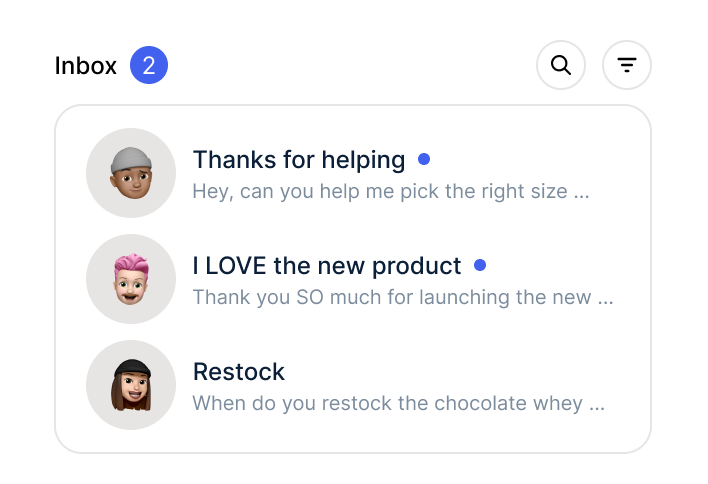
The OTTO mailbox used to be the channel that "someone checked on the side". With the connection, that side task disappears: OTTO inquiries sit in the same list as everything else and get answered in the normal flow instead of at the end of the day.

An OTTO customer asks how to send an order back. The ticket gets tagged automatically and lands with the team that knows your return processes. The answer arrives well-founded and fast, instead of bouncing between responsibilities.
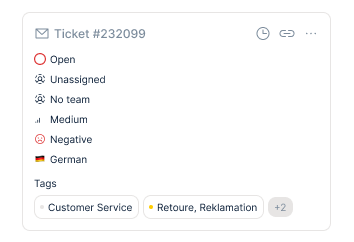
Without armincx, the OTTO mailbox is a sideshow. It gets checked when there is time, inquiries appear in no report and during peak season you only notice late how much has piled up there.
With armincx, the sideshow is over. OTTO inquiries sit as tickets in the central inbox, follow your routing rules, carry tags and appear in your analytics. Your team answers them in the normal workflow, with an AI draft and without switching systems.
Three steps to centralized marketplace support.

Create your account, invite your team, set up the inbox. Your personal Customer Success Manager is with you from the start.

The customer communication of your OTTO account connects via email forwarding. Your CSM sets it up together with you, no technical setup needed.
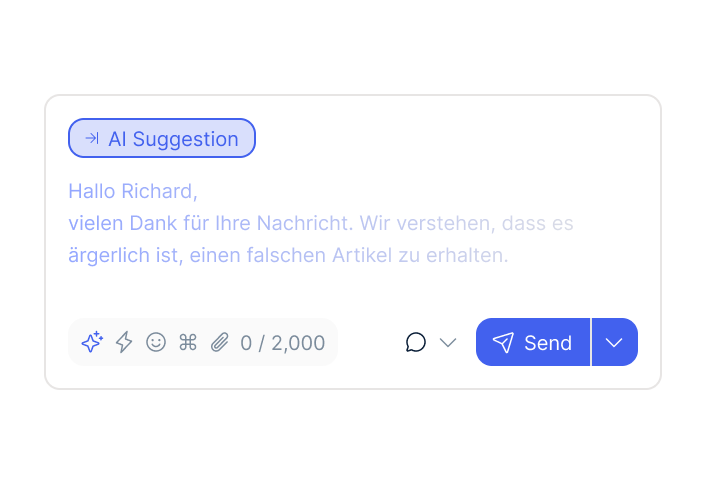
OTTO inquiries appear as tickets, routing and reply style are configured. Your team reviews the AI drafts and sends.
Create your account, invite your team, set up the inbox. Your personal Customer Success Manager is with you from the start.
The customer communication of your OTTO account connects via email forwarding. Your CSM sets it up together with you, no technical setup needed.
OTTO inquiries appear as tickets, routing and reply style are configured. Your team reviews the AI drafts and sends.
The OTTO connection belongs to the armincx package, with no extra costs and no setup fees. Pricing stays as usual: flat rate without seat or ticket costs, variable costs arise exclusively for AI actions, meaning whenever the AI actually creates a draft. You are billed for what you use.
Your personal Customer Success Manager guides you through the complete process:
Go-live: a few days, the channel connection works without technical setup.
armincx is ISO 27001 certified, all servers are located in Frankfurt am Main. OTTO inquiries are also processed exclusively in the EU and only the data required for ticket handling flows through. Data processing agreement (DPA) available.
NEOH

“Chatarmin helps our company tremendously to deliver our news and promotions to customers better and faster.”
Finn Fleischer
FarbenLöwe

“POV: How to scale an e-commerce business to 20M with 2.5 FTE in customer service.”
Florian Wimmer
Purora

“Efficient tool with versatile features, fast integration, and a competent team.”
Joshua Vedder
Smilodox

“We love and use Chatarmin at Smilodox.”
André Jonker
Mozart Bett

“Impressive software and strong team!”
NEOH
“Chatarmin helps our company tremendously to deliver our news and promotions to customers better and faster.”
FarbenLöwe
“POV: How to scale an e-commerce business to 20M with 2.5 FTE in customer service.”
Purora
“Efficient tool with versatile features, fast integration, and a competent team.”
Smilodox
“We love and use Chatarmin at Smilodox.”
Mozart Bett
“Impressive software and strong team!”
These tools complement your marketplace support.

Multichannel tool that brings orders from multiple shops and marketplaces into your armincx ticket. OTTO orders included.

Multichannel ERP that brings order data from your shops and marketplaces into the armincx ticket.

Order data and customer context in the ticket. Works with all Shopify plans, including Plus.
Everything you need to know about the connection.
Through an email forwarding from your OTTO account. Every customer inquiry from OTTO Market becomes a regular armincx ticket, including routing, tags and an AI draft.
OTTO Market is the marketplace where you sell as a merchant. OTTO Partner Connect is the corresponding seller portal where you manage your assortment, orders and actions like cancellations. armincx takes over the customer communication of your OTTO business, order management stays in Partner Connect.
For every OTTO ticket, an AI draft in your brand tone is ready, like for any email ticket. Nothing goes out before your team has reviewed the suggestion.
Yes, through your order management: if your marketplace orders come together in Billbee or Plenty One, the respective integration brings the order data into the ticket.
Nothing extra, the OTTO connection is part of the armincx package. Variable costs only arise when the AI actually creates drafts.
Yes. You connect Kaufland as a channel the same way, and for Amazon Seller Central there is a native integration with order data right inside the ticket.

Bring OTTO Market into your armincx setup. All channels in one system, AI drafts included.