GDPR-compliant
Meta Business Partner
ISO 27001
Your scenarios trigger the flow, Chatarmin sends the WhatsApp message and writes consent and profile data back. Segments and orchestration stay in Bloomreach.


































The quick check for decision makers
Bloomreach knows your customers, your events and your journeys. Chatarmin adds the channel your customers see on their lock screen.
A scenario in Bloomreach Engagement reacts to an event and calls Chatarmin through a webhook. Chatarmin starts the matching flow and sends the WhatsApp message with first name, product image and a direct link.
You build the scenario in Bloomreach the way you always do, for example on a cart abandoned event. As an action you add a webhook to Chatarmin and pass the customer data the message needs. Chatarmin starts the flow and sends the message at the right moment. Timing, waits and branches stay in your Bloomreach scenario, so your team keeps working in the familiar canvas.
Your Bloomreach segments and customer properties are available in Chatarmin as an audience. You decide who receives a campaign and personalise the copy with the attributes from the customer profile.
You keep your segments in Bloomreach. In Chatarmin you pick the segment as the audience and use customer attributes as conditions inside the flow. A customer with a high lifetime value receives a different message than a first-time buyer, and the logic comes from data your team already maintains. There is no second segmentation to build.
Chatarmin writes WhatsApp consent and profile updates back to Bloomreach through the Track API. Your customer profile shows who you can reach on WhatsApp.
Bloomreach handles permissions as consent categories on the customer profile. Chatarmin mirrors that model and writes WhatsApp consent back as its own category. You can also pass activity events from flows and campaigns, so your Bloomreach reporting counts the WhatsApp channel. For teams with a legal department this is the decisive point, because the permission sits where the email permission sits.
Bloomreach Engagement is your customer data platform and your orchestration layer. Chatarmin is the WhatsApp channel underneath. That split stays in place, which is why you change very little about your setup.
Scenario webhooks start a flow in Chatarmin. Inside the scenario you decide which customer data travels with it, for example first name, cart value, product image or order number. Your segments and customer properties come across as audiences and as conditions inside the flow, so you personalise messages with the same attributes your emails use.
WhatsApp consent lands in the customer profile as its own consent category through the Track API. Profile updates such as the phone number or the opt-in timestamp take the same route. On request Chatarmin passes activity events from flows and campaigns, so you see in Bloomreach who received, opened or answered a message.
Revenue data stays where it is created. If your shop already sends orders to Bloomreach, attribution happens in your usual reporting. WhatsApp activity arrives as an event, so you can measure purchases that follow a WhatsApp message.
You need a project token, an API key ID with secret from the private API and the base URL of your Bloomreach project. For real-time triggers you add a webhook inside the scenario. We set the connection up together with you, so the data fields match your setup from day one and your team builds on top of it afterwards.
Three workflows that come straight out of your existing scenarios.
Your scenario checks after 48 hours whether the email was opened. If it was not, the same content goes out on WhatsApp. The branch sits in Bloomreach, the sending runs through Chatarmin.

You take a segment from your Bloomreach predictions and run it as a WhatsApp campaign before the customer leaves.
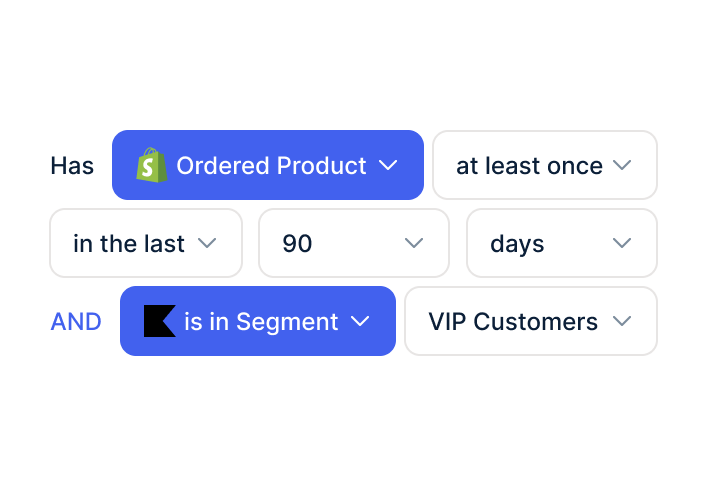
Chatarmin collects WhatsApp opt-ins through widget, QR code or checkout and writes them into the Bloomreach profile as a consent category.

A customer adds products to the cart and does not buy. Your scenario in Bloomreach picks up the event and calls Chatarmin. 30 minutes later a WhatsApp message arrives with the product image, the first name and a direct checkout link.
The difference to a standalone WhatsApp tool sits in the data. Your scenario knows the cart value, the purchase history and the segment of that customer. You decide before sending who gets a reminder with a discount and who gets one without. At 11 cents per marketing conversation the flow pays off at a low conversion rate.
Your email sequence keeps running in parallel. Consent data in the profile tells you who receives which channel, so nobody reads the same reminder twice.
As soon as a customer gives WhatsApp consent, Chatarmin writes it into the Bloomreach profile through the Track API. You then build segments in Bloomreach such as "has WhatsApp consent" or "responds on WhatsApp, rarely opens email" and steer your channels accordingly.
For your reporting that means the WhatsApp channel shows up in the same dashboards as email and SMS. For your legal team it means the permission is documented in the customer profile, including timestamp and source. And for your CRM team it means an opt-out in Bloomreach also applies to WhatsApp, because both systems read the same consent category.


Disclaimer: All data conducted from over 50+ Sales Calls with DACH Ecom Owners
The integration fits brands that run Bloomreach Engagement as their central customer data platform and steer their journeys there. That setup usually holds a lot of work: the data model, segments, predictions and a team or agency maintaining it daily. This is exactly why WhatsApp arrives here as an addition and not as a second system.
Part of your customer base stops opening newsletters. You can see that group in Bloomreach, because your engagement score and your predictions already flag them. WhatsApp reaches them with an 85% open rate, and your email programme stays untouched.
Bloomreach customers in the DACH region usually have a legal department involved. Chatarmin is an official Meta Business Partner, certified to ISO 27001 and hosted in Europe. WhatsApp consent sits as its own category in the Bloomreach profile, documented with timestamp and source.
Many Bloomreach projects run through partner agencies. The scenario logic stays with them, Chatarmin joins as the channel. We set the connection up with you and hand over to the team that works in the canvas anyway.
What leading E-Commerce brands from the DACH region say about armincx
Jakob Graf
HANS Brainfood

“Easy integration with Shopify and Klaviyo, simple setup of all technical aspects. Direct customer reach with open rates over 85% and amazing ROI on WhatsApp costs. Perfect for top customers and as an exclusive sales element.”
Victor Horst
cusbclo

“If you’re not using WhatsApp marketing yet, go to Chatarmin.”
Lisa Straube
BitterLiebe
“I would recommend other companies to try WhatsApp marketing as well and implement it with Chatarmin.”
Matthias Leibitz
T1TAN

“Top tool. Integrates into our entire tech stack.”
HANS Brainfood
“Easy integration with Shopify and Klaviyo, simple setup of all technical aspects. Direct customer reach with open rates over 85% and amazing ROI on WhatsApp costs. Perfect for top customers and as an exclusive sales element.”
cusbclo
“If you’re not using WhatsApp marketing yet, go to Chatarmin.”
BitterLiebe
“I would recommend other companies to try WhatsApp marketing as well and implement it with Chatarmin.”
T1TAN
“Top tool. Integrates into our entire tech stack.”

You provide the project token, the API key ID with secret from the private API and the base URL of your Bloomreach project.

We store the credentials in Chatarmin and check the connection to your project together.
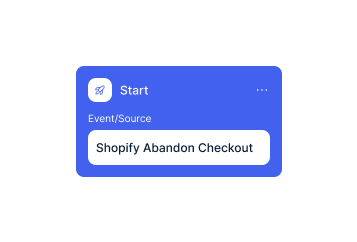
In Bloomreach you add the scenario webhook. We usually start with cart recovery and add the other flows afterwards.
You provide the project token, the API key ID with secret from the private API and the base URL of your Bloomreach project.
We store the credentials in Chatarmin and check the connection to your project together.
In Bloomreach you add the scenario webhook. We usually start with cart recovery and add the other flows afterwards.
Meta charges 11 cents per marketing conversation in Germany. In Austria and Switzerland it is 5 cents. Conversations your customer starts are free, and service messages inside the 24-hour window cost you nothing. A shipping notification is therefore free, while a campaign to 10,000 contacts costs you 1,100 euros in Meta fees in Germany.
The connection to Bloomreach is part of your Chatarmin setup rather than a separate product. What Chatarmin costs depends on your volume. In a call we walk you through the numbers based on your contact base and the flows you plan.
Chatarmin fits into your tech stack.
Everything worth knowing about the integration.
Your consent stays in Bloomreach. Chatarmin writes WhatsApp consent back into the customer profile as its own consent category, so you steer all channels from one system.
Yes. Bloomreach keeps controlling timing and logic. Chatarmin handles the sending and reports the results back.
Scenario webhooks as triggers, plus segments and customer properties for audiences, conditions and personalisation.
WhatsApp consent and profile updates through the Track API, plus activity events from flows and campaigns on request.
Revenue data sits in Bloomreach as soon as your shop sends it there. WhatsApp activity arrives from Chatarmin, so you build attribution in your usual reporting.
No. Your data stays in Bloomreach. Chatarmin reads from it and writes back.
A project token, an API key ID with secret from the private API and the base URL of your Bloomreach project. For real-time triggers you also need the scenario webhook.
Once the credentials are there, we set the connection up with you and start with the first flow.
Meta charges 11 cents per marketing conversation in Germany and 5 cents in Austria and Switzerland. Conversations your customer starts are free.
The Bloomreach integration belongs to the WhatsApp marketing product. For customer service there is armincx by Chatarmin with its own integrations.

We look at your stack and show you which flow brings revenue first. 15 minutes, free, with clear numbers.