
A WhatsApp chatbot, also called a WhatsApp Business chatbot, answers customer enquiries directly in WhatsApp, around the clock and in your customers' language. For businesses, it runs on the WhatsApp Business API and an official Meta partner. Modern AI bots answer only from your own data and hand difficult cases to your team with the full chat history. Meta does not charge for the first 1,000 replies per number and month. At Chatarmin, most bots go live within a week.
This guide explains how a WhatsApp bot works and which five use cases pay off in e-commerce. After that, you build your own bot in six steps and see what it really costs.
What is a WhatsApp chatbot?
A WhatsApp chatbot is a program that receives messages sent to your WhatsApp Business account and answers them on its own. Whether you call it a WhatsApp bot or a chatbot for WhatsApp, it means the same thing. Today there are three types, and they differ a lot in what they do for your support team.
| Type | How the bot answers | Good for | Limit |
|---|---|---|---|
| Rule-based bot | Fixed menus, buttons and keywords | Opening hours, simple routing | Cannot understand freely worded questions |
| AI chatbot | A language model writes answers from your knowledge base | FAQs, product advice, sizing questions | Can read data but cannot trigger actions in your shop |
| AI agent | AI plus access to shop, shipping and helpdesk | Order status, returns, address changes | Needs clean integrations and rules |
For most shops, the AI chatbot is the right place to start. As soon as the bot needs to look up or change orders, you need an AI agent.
Is Meta AI in WhatsApp the same as a business chatbot?
No. Meta AI is the assistant Meta has built into the WhatsApp app itself, and it belongs to no business. A business chatbot answers only in the chat with your business profile, using your name and your knowledge.
Many users want to know how to recognise a bot in a chat. Since 2 August 2026, Article 50 of the EU AI Act requires an AI chatbot to disclose that it is AI, unless this is obvious. A trustworthy business bot therefore says so in its first message and shows the way to a human. Baker Botts gives a good overview of the obligation.
Which chatbots does Meta allow on WhatsApp?
Meta allows chatbots that handle a specific task for your business, such as support, order status or product advice. Since 15 January 2026, Meta's terms for the WhatsApp Business Platform prohibit general-purpose AI assistants when the AI itself is the product. Providers such as OpenAI have shut down their WhatsApp bots as a result. A shop bot that answers from your catalogue and your policies remains allowed.
Do you need the Business API for a WhatsApp chatbot?
Yes, a real chatbot needs the WhatsApp Business API. The free WhatsApp Business app can only send greeting messages, away messages and quick replies. The app does not support a bot that understands questions or accesses your shop data.
You get the API through a Business Solution Provider (BSP). The BSP provides access, the inbox for your team and the bot interface. Chatarmin is an official Meta Business Partner and takes on this role. Our guide to the WhatsApp Business API explains what else the API can do.
Developers can also build a bot themselves on Meta's Cloud API, for example with Python or Node.js. This only pays off with your own development team, because an inbox, handover to humans and maintenance come on top.
How important is business verification?
Verifying your business portfolio with Meta is the foundation for everything else. New business portfolios start with a limit of 250 recipients per 24 hours for messages you initiate. Via one of the scaling paths, such as verification, the limit rises to 2,000 and then increases automatically step by step (Meta documentation).
For your chatbot, this is good to know: replies within the customer service window do not count towards the limit. The verification badge, which Meta now shows in blue, is a separate application and depends on how well known your brand is.
How does an AI chatbot work on WhatsApp?
For every question, an AI chatbot searches your knowledge base for the right passages and lets a language model write an answer from them. The technical term is RAG, retrieval-augmented generation. This way, the bot answers from your sources and invents no delivery times or return rules.
Older bots only searched for keywords. If the text contained "delivery time", the standard answer on delivery times came back. That works for ten FAQ questions and fails as soon as customers phrase things differently.
How RAG works in practice
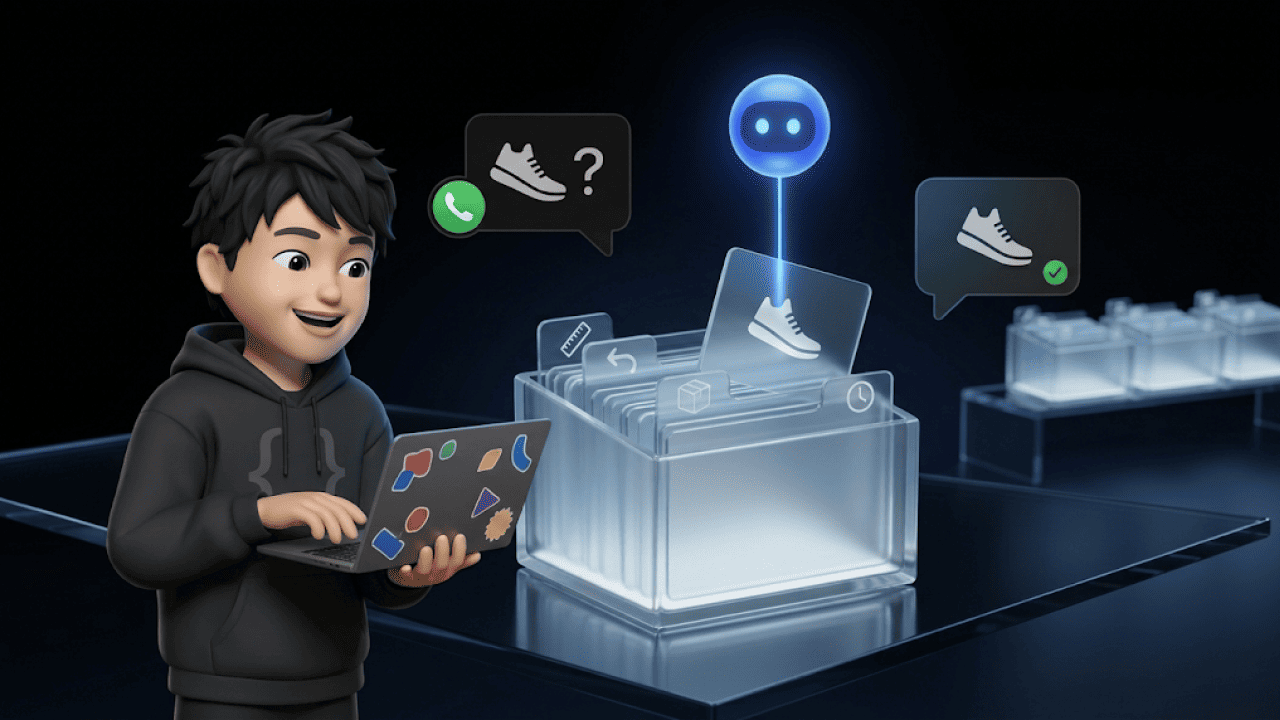
You add your knowledge sources: website, product catalogue, documents such as return policies and your own question-and-answer pairs. The system splits the texts into sections and stores them so that it finds similar meanings quickly. If a customer asks "Do you have these shoes in size 46?", the bot pulls the sections on sizes and availability for its answer.
What happens if the bot cannot find an answer?
If the bot finds nothing suitable, it says so openly and hands over to your team. With Chatarmin's WhatsApp AI chatbot, the bot answers exclusively from your stored sources, and protection against prompt injection is active by default. You decide when the bot hands over, for example for complaints or VIP customers. Your team receives the complete chat history.
What can a WhatsApp bot do? 5 e-commerce examples
A WhatsApp bot pays off wherever your team answers the same question several times a day. These five use cases deliver the most in an online shop.
1. Answering order status questions
"Where is my order?" is the most common support question in e-commerce. The bot asks for the order number, fetches the status from the shop and sends the tracking link. For this, it needs access to your shop and your shipping provider.
2. Giving product advice
The bot asks about size, occasion or budget and knows your entire catalogue. Every recommendation ends with a direct link to the matching product in your shop.
3. Starting returns
The bot explains the return period in one sentence and then guides the customer through the return step by step. Connected to your returns tool, it creates the return directly.
4. Qualifying contacts and collecting opt-ins
When someone enters the chat via a QR code or an ad, the bot asks two or three questions. It saves the answers as attributes on the contact. At the end, it asks for consent to the newsletter, so you are allowed to message the person later.
5. Collecting feedback after purchase
A few days after delivery, the bot asks about satisfaction. It sends happy customers to a review page and unhappy ones straight to your team.
What does this mean in numbers?
In our AI customer service benchmark with 131 shops and 2.9 million tickets, 32.9% of all resolved tickets are automated. When the AI touches a ticket, it resolves it completely on its own in one in five cases. Workflow tickets close after a median of one day, manual ones after three days.
One example from practice is the bedding retailer Zelesta. There, the AI agent of armincx by Chatarmin is the first point of contact on WhatsApp and involved in 99% of WhatsApp enquiries. Since the second month, more than 45% of over 30,000 tickets per month run fully automatically.
Which interactive messages can your bot send?
Besides text, your bot can send buttons, lists, product cards and media. Every button that saves typing keeps the customer in the conversation.
| Format | What it does | Typical use |
|---|---|---|
| Reply buttons | Up to 3 reply buttons below a message | Yes/no, opt-in, simple choices |
| List messages | A menu with up to 10 options | Main menu, topic selection |
| Product messages | Product cards from your catalogue with image and price | Recommendations, cross-selling |
| Media messages | Images, videos, PDFs and voice messages | Instructions, size charts, invoices |
The limits come from Meta's developer documentation. Keep button labels short, because WhatsApp only allows 20 characters there.
Create a WhatsApp chatbot: your own bot in 6 steps
You need no programming skills for a WhatsApp chatbot. What matters is a clear goal, a well-maintained knowledge base and a clean opt-in. Here is how to proceed.
Step 1: Define your goal
A support bot should reduce tickets, a sales bot should advise and sell. Most shops start with a hybrid: the bot answers support questions and uses suitable moments for a recommendation. Set your KPIs in advance, such as automation rate, response time and satisfaction.
Step 2: Choose a provider
Look for official BSP status, hosting in the EU, a data processing agreement (DPA) and integrations for Shopify, Klaviyo or your helpdesk. Ask specifically which sources the bot answers from and how the handover to your team works. At Chatarmin: hosting in the EU, servers in Germany.
Step 3: Build your knowledge base
Your bot is only as good as the data it gets. Export your support tickets from the last three months and sort them by frequency. The top topics go into the knowledge base as FAQ pairs, together with product information, size charts and policies.
Step 4: Plan your flows
A flow is a fixed conversation path with a trigger, questions and an answer. Start with four flows: welcome with opt-in, support, order status and product advice. Our WhatsApp Flows feature shows how to build flows without code.
Step 5: Set up a GDPR-compliant opt-in
In Germany, Austria and Switzerland, you need explicit consent for promotional messages, ideally via double opt-in. If the customer starts the chat, you may reply in that conversation, but you may not yet send later offers. So ask for consent directly in the welcome flow, with "Yes, please" and "Support only" as buttons.
Step 6: Test and improve
Let the bot suggest answers first, which your team approves. In Chatarmin's draft reply mode, you see how well the bot answers before it writes on its own. After that, check every week which questions remained open and add to the knowledge base.
How long does it take to set up a WhatsApp chatbot?
For most Chatarmin customers, a WhatsApp chatbot is live within a week. Website crawl and catalogue sync run automatically, and your Customer Success Manager sets tone and handover rules with you in one or two sessions.
Before that, you need a Meta business account and a number for the API. If you already use your number in the Business app, you can run it in parallel in the app and the API via Coexistence. Larger migrations take longer: Zelesta migrated in around six weeks, including two years of ticket history.
How much does a WhatsApp chatbot cost?
A WhatsApp chatbot costs your provider's fee plus Meta's fees for messages. Since 1 October 2026, Meta only waives the first 1,000 service messages per number and month, after which the country's utility rate applies. Meta charges per delivered message, depending on category and the recipient's country (Meta documentation).
| Message | Example | Meta fee |
|---|---|---|
| Service | The bot replies freely within 24 hours to a customer question | First 1,000 per number and month free, then utility rate per country |
| Utility | Order status or shipping confirmation as a template | €0.0456 in Germany, €0.0142 in Austria and Switzerland |
| Marketing | Offer, newsletter, abandoned cart reminder | €0.1131 in Germany, €0.0490 in Austria and Switzerland |
Meta list prices in EUR per delivered message, excluding VAT, as of 1 October 2026.
If a customer writes to you via a Click-to-WhatsApp ad and you reply within 24 hours, Meta opens a window of up to 7 days. During this time, all message types are free according to Meta, provided the customer writes via the mobile app.
Chatarmin passes on Meta's fees 1:1 without any mark-up. You receive the software price after a short demo, matched to your volume. Our overview of WhatsApp Business costs covers every category in detail.
Is there a free WhatsApp bot?
A fully featured WhatsApp bot is only available for free with restrictions. The Business app is free, but it can only send fixed greeting and away messages. Some bot builders offer a free entry plan, but Meta fees apply from the 1,001st reply each month, plus your time for maintenance.
When is a WhatsApp chatbot not worth it yet?
A chatbot only pays off once enough enquiries come in via WhatsApp. In our benchmark, only 11.2% of support tickets arrive via WhatsApp, while email accounts for 63%. So first check where your customers write, and start the bot where the volume is.
Typical mistakes at the start:
- Trying to automate everything: Complaints and emotional cases belong with a human.
- Too many topics at once: A bot that masters three topics reliably beats one that half-masters twenty.
- Set up and forget: New products and changed policies need to go into the knowledge base.
- Sending only text: Buttons and lists make the bot faster to use and reduce drop-offs.
Conclusion: how to get started with your WhatsApp chatbot
The technology for a good WhatsApp chatbot is mature, and Meta charges nothing for the first 1,000 replies per number and month. The difference lies in the knowledge base, clear handover rules and the choice of first topics. Start with order status and your ten most frequent questions, then expand step by step.
Book a demo and see how a WhatsApp chatbot answers your shop's most frequent questions. 15 minutes, free, right in the product.
FAQ: frequently asked questions about WhatsApp chatbots
How much does a WhatsApp chatbot cost?
The costs consist of your provider's fee and Meta's fees per message. The first 1,000 service replies per number and month are free.
Is there a free WhatsApp bot?
It depends. The Business app is free but can only send fixed greeting and away messages, and an AI bot is only available via the API.
Do I need programming skills for a WhatsApp bot?
No. With providers such as Chatarmin, you build flows without code and train the bot with your website, catalogue and documents.
Is a WhatsApp chatbot GDPR-compliant?
It depends. It is compliant if your Business API provider offers EU hosting and a DPA and you have an opt-in for promotional messages.
Can I use my existing WhatsApp number?
It depends. You can use a number from the Business app in parallel with the API via Coexistence, but private numbers are not intended for this.
How long does the setup take?
For most Chatarmin customers, the bot is live within a week. Larger migrations with ticket history take several weeks.
What is the 24-hour window?
When a customer writes to you, you can reply freely for 24 hours, and the first 1,000 such replies per number and month are free. If the customer comes via a Click-to-WhatsApp ad, all messages are free for up to 7 days.
What does RAG mean for AI chatbots?
RAG means the bot searches your knowledge base for relevant passages for every question and answers only from them. This way, you avoid made-up statements.
What happens if the chatbot does not know the answer?
It says so openly and hands over to your team. The agent receives the entire chat history.
Can a WhatsApp chatbot send images and videos?
Yes. Via the API, the bot can send images, videos, PDFs, voice messages and product cards from your catalogue.