DSGVO-konform
5-Min-Setup
ISO 27001
Connect Chatarmin to your entire tech stack via Zapier. CRM data triggers WhatsApp flows. ERP events become messages. Without a single line of code.


































Quick check for decision makers
Your entire tech stack connected with WhatsApp.
Any system with a Zapier connector becomes a data source for your WhatsApp flows. CRM, ERP, spreadsheets, forms.
All apps with a Zapier connector. Pipedrive, HubSpot, Salesforce, Google Sheets, Typeform, Calendly, Airtable, Notion, and thousands more. Chatarmin provides triggers and actions: you can send events from Chatarmin outward and use external events as WhatsApp flow triggers.
The visual Zap builder makes complex automations accessible for marketing, sales, and ops teams.
From simple single-step Zaps (trigger: new CRM contact, action: send WhatsApp) to multi-step workflows with filters, conditions, and delays. Chatarmin solution engineers help with setup of more complex Zaps. Multi-step Zaps require a paid Zapier plan.
Contacts and deal data flow bidirectionally. ERP systems without native APIs connect through Zapier.
CRM-to-WhatsApp: deal stage change triggers follow-up. WhatsApp-to-CRM: bot responses are saved as custom fields. ERP-to-WhatsApp: order status update becomes customer notification. WhatsApp-to-Spreadsheet: campaign results automatically flow into Google Sheets for reporting.
Zapier connects Chatarmin with over 5,000 apps. CRM, ERP, project management, email tools, spreadsheets, form builders. Any system with a Zapier connector becomes a data source or trigger for your WhatsApp flows.
The principle: an event in System A triggers an action in Chatarmin. New lead in your CRM? WhatsApp welcome message. Order status update in the ERP? Shipping notification via WhatsApp. Form submitted on your website? WhatsApp follow-up in seconds.
The connection runs via webhooks. Chatarmin provides both triggers (events from Chatarmin) and actions (send messages, create contacts) for Zapier. You do not need a developer. The visual Zap builder makes configuration accessible for marketing, sales, and ops teams.
Chatarmin has native integrations with the most important e-commerce systems: Shopify, Shopware, Klaviyo, WooCommerce, and more. For these tools, you do not need Zapier.
Zapier becomes relevant when you want to connect systems that Chatarmin does not cover natively. Typical examples from 47 sales calls mentioning Zapier:
The rule of thumb: use native integrations where available. Use Zapier where no native connection exists or where you want to chain multiple systems in one workflow.
Teams with a tech stack beyond the standard e-commerce combination of Shopify + Klaviyo. Three profiles come up most frequently in our conversations:
Important: Zapier does not replace a WhatsApp marketing platform. Zapier delivers data and triggers. Chatarmin delivers the flow builder, opt-in management, revenue attribution, and the WhatsApp Business API.
Contact gets updated in the CRM, Zapier detects the change, Chatarmin sends the right WhatsApp message. Works with Pipedrive, HubSpot, Salesforce, and any CRM with a Zapier connector.
Order status changes in the ERP? Return gets processed? Zapier bridges the gap between legacy systems and WhatsApp. Automatic customer notifications without manual effort.

Form submitted, lead qualified, CRM updated, WhatsApp welcome message sent. All in one Zap. Complex workflows without code.

The connection between Zapier and Chatarmin incurs no additional costs from Chatarmin. You need an active Zapier account (the free plan works for simple Zaps, more complex multi-step Zaps require a paid Zapier plan).
For WhatsApp messages, Meta charges 11 cents per marketing message in Germany. In Austria and Switzerland it is around 5 cents (as of 2026). Service messages within a 24-hour window are free.
11 cents per message sounds like a lot at first. But WhatsApp messages generate 2 to 3x higher revenue per recipient than emails. Assume you generate 1 EUR revenue per recipient via email, then you will land at around 2.50 EUR via WhatsApp. Minus 11 cents in Meta fees, you still have 139% higher net margin per contact than via email. That is why over 450 e-commerce brands successfully run WhatsApp marketing with Chatarmin.

Disclaimer: All data conducted from over 50+ Sales Calls with DACH Ecom Owners
The most common Zapier use case in our sales calls: feeding CRM data into WhatsApp flows. A contact gets updated in the CRM, Zapier detects the change, Chatarmin sends the right message.
This works with any CRM that has a Zapier connector. Pipedrive deal changes stage? WhatsApp reminder. HubSpot contact gets a new tag? WhatsApp campaign. Salesforce opportunity gets created? Welcome message via WhatsApp.
All interaction data flows back: open rates, replies, opt-in status land back in the CRM via Zapier. Your sales team sees the complete WhatsApp history in the contact profile.
The second major block: connecting ERP systems with Chatarmin. Order status changes in the ERP? WhatsApp update to the customer. Return gets processed? Automatic notification via WhatsApp.
Particularly valuable for teams with legacy ERPs that do not offer a direct API. Zapier bridges the gap. Chatarmin solution engineers help with Zap setup when needed.
What leading E-Commerce brands from the DACH region say about armincx
Christoph Lung
Duschbrocken

“armincx integrates with our entire tech stack and even automates the Asana tickets for our logistics. I am really impressed with the tool.”
Lisa Krapinger-Ruether
NEOH

“Chatarmin helps our company tremendously to deliver our news and promotions to customers better and faster.”
Jakob Graf
HANS Brainfood

“Easy integration with Shopify and Klaviyo, simple setup of all technical aspects. Direct customer reach with open rates over 85% and amazing ROI on WhatsApp costs. Perfect for top customers and as an exclusive sales element.”
Duschbrocken
“armincx integrates with our entire tech stack and even automates the Asana tickets for our logistics. I am really impressed with the tool.”
NEOH
“Chatarmin helps our company tremendously to deliver our news and promotions to customers better and faster.”
HANS Brainfood
“Easy integration with Shopify and Klaviyo, simple setup of all technical aspects. Direct customer reach with open rates over 85% and amazing ROI on WhatsApp costs. Perfect for top customers and as an exclusive sales element.”

Create a Chatarmin account and connect the WhatsApp Business API.

Search for Chatarmin in Zapier and add the API key.
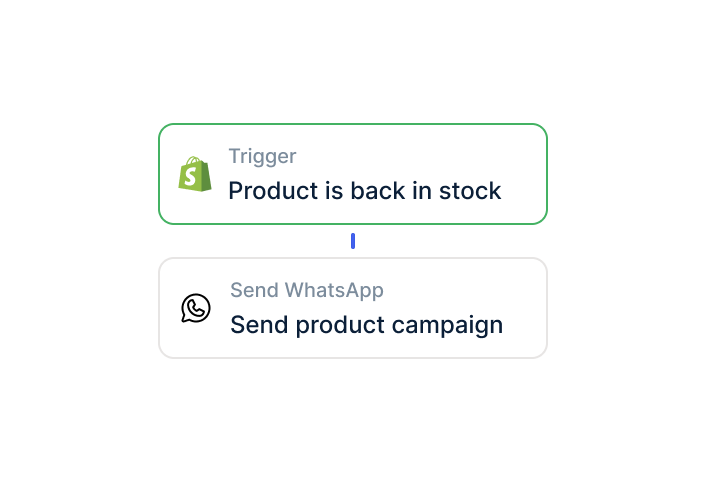
Build your first Zap: select a trigger and configure the WhatsApp flow.
Create a Chatarmin account and connect the WhatsApp Business API.
Search for Chatarmin in Zapier and add the API key.
Build your first Zap: select a trigger and configure the WhatsApp flow.
The Zapier integration setup takes under 15 minutes:
Chatarmin offers personal onboarding. Our solution engineering team builds complex Zaps for you when needed. You do not have to configure Zapier workflows on your own. Typically, the first productive Zap is live within 48 hours of the onboarding call.
Chatarmin hosts all data on servers in Germany. The WhatsApp Business API runs through the official Meta interface. Contact data is processed in full GDPR compliance.
Zapier offers EU data processing for paid plans. For GDPR-sensitive setups, we recommend the Zapier option "Data Residency: EU." This keeps all data within the EU.
Opt-in management is built directly into Chatarmin: only contacts with valid WhatsApp opt-in receive marketing messages. This applies regardless of which Zapier trigger brought the contact into Chatarmin.

The deepest native integration for e-commerce: abandoned cart, post-purchase, revenue attribution directly from Shopify.

Connect email and WhatsApp as a cross-channel strategy. Sync segments and reach email non-openers via WhatsApp.

Connect your sales pipeline with WhatsApp. Deal stages trigger follow-ups and leads get pre-qualified via WhatsApp bot.
Everything you need to know about the Zapier WhatsApp integration.
Chatarmin has native integrations with Shopify, Shopware, Klaviyo, WooCommerce, and more e-commerce tools. You only need Zapier when you want to connect systems that Chatarmin does not cover natively. Typical examples: Pipedrive, Salesforce, Google Sheets, Typeform, or legacy ERP systems. The rule of thumb: use native integrations where available, use Zapier where no native connection exists.
Yes. Chatarmin works with both platforms using the same webhook logic. Make.com offers more complex multi-step workflows and is popular with many DACH customers. Zapier has the larger app catalog with over 5,000 connections. Our solution engineering team helps you decide and set up on either platform.
Chatarmin charges no additional costs for the Zapier connection. You need an active Zapier account. Simple Zaps work on the free Zapier plan. Multi-step Zaps require a paid plan. For WhatsApp messages, Meta charges 11 cents per marketing message in Germany and around 5 cents in Austria and Switzerland.
The Zapier Zap builder is visual and requires no code. You search for Chatarmin in Zapier, add the API key, and configure triggers and actions via drag-and-drop. For more complex multi-step Zaps with filters and conditions, our solution engineering team helps with setup. You do not have to configure Zapier on your own.
Bidirectional. From external apps to Chatarmin: contact data, tags, custom fields, event triggers. From Chatarmin outward: WhatsApp open rates, replies, opt-in status, flow results. You can use CRM contact data as WhatsApp flow triggers and automatically write campaign results back to the CRM.
Chatarmin hosts all data on servers in Germany. Zapier offers EU data processing for paid plans. We recommend the Zapier Data Residency EU option for GDPR-sensitive setups. Opt-in management is built directly into Chatarmin. Only contacts with valid opt-in receive marketing messages, regardless of which Zapier trigger brought them into Chatarmin.

Automate marketing and support in one platform.