GDPR-compliant
Made for DACH
ISO 27001
Incoming eTrusted reviews automatically become tickets in the armincx inbox. Negative reviews get prioritised, and the AI prepares a draft reply for every review. Your team reviews, clicks, sends back to eTrusted.


































Quick check for decision makers
eTrusted in the armincx ecosystem.
Every eTrusted review lands as a ticket in the armincx inbox. No more tab-switching into the eTrusted backend.
Stars, customer name, order number and review text flow into the ticket automatically. Your team handles reviews right where they're already managing emails, WhatsApp and Instagram DMs.
armincx detects sentiment automatically and prioritises critical reviews.
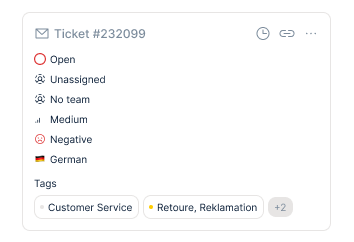
Negative reviews appear at the top of the inbox and are tagged. No complaint gets lost between five-star praise. You see at a glance what needs attention first.
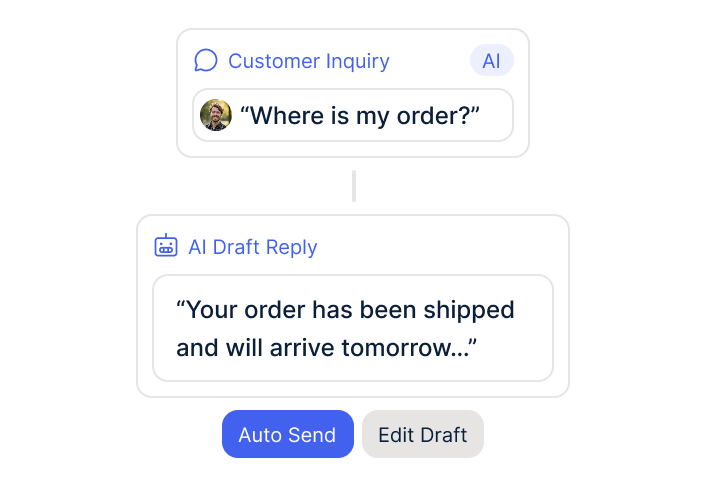
The AI prepares a draft reply for every review. Your team reviews and sends.
The draft uses context from the order and your shop system. You edit or confirm – the finished reply goes back to eTrusted. No AI autopilot answering under your brand name.
The eTrusted integration connects your review management directly with the AI customer service from armincx. As soon as a new service or product review hits your eTrusted account, it flows automatically as a ticket into the armincx inbox – with stars, customer name, order number and full review text. Your team handles reviews right where they're already managing emails, WhatsApp and Instagram DMs. No tab-switch into the eTrusted backend, no parallel tools.
armincx analyses the sentiment of every incoming review automatically and prioritises negative reviews in the inbox. Instead of getting buried between five-star praise, critical reviews show up at the top with a clear marker. For every review – positive or negative – the AI generates an answer draft that uses context from eTrusted and your shop system. Your team reviews, adjusts and sends back to eTrusted.
You control per eTrusted channel whether service reviews only, product reviews only, or both flow into armincx as tickets. This lets you separate different response workflows – for example, service reviews handled centrally by customer service, product reviews optionally routed to the product or e-commerce team. Multi-brand, multi-shop or multi-location setups keep their entity context, so the responsible team only sees the reviews relevant to them.
Every new review from eTrusted flows automatically into the armincx inbox. Stars, customer name, order number and review text are immediately visible. Your team handles them from one system.
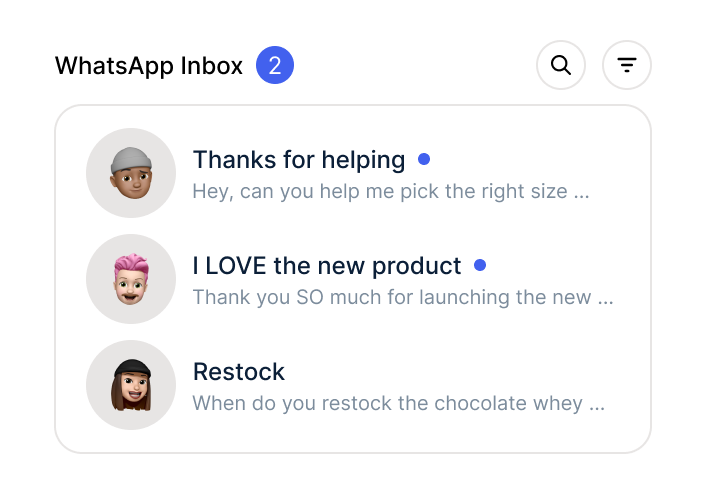
armincx detects sentiment automatically and prioritises critical reviews in the inbox. Negative reviews are tagged so no complaint gets buried between positive ones.
For every review, the AI prepares a draft reply based on review text and order context. Your team reviews, adjusts and sends back to eTrusted.

Three concrete workflow scenarios that happen in practice with the integration:
Reply to delivery complaints with context. A two-star review lands as a prioritised ticket in armincx. The AI spots the keyword "delivery" in the review text, pulls the matching order number from eTrusted and checks the delivery status in the shop system. The draft contains the actual delivery status plus a proposed solution – instead of a generic apology.
Route product reviews to the right team. A three-star product review about fit lands in a ticket. Via the channel settings, product reviews are routed directly to the e-commerce team rather than customer service. The team responds with sizing advice – instead of a service apology that misses the point.
Positive reviews with a real reply, not a stock phrase. A five-star review praises a specific product. The AI recognises the mentioned item, pulls order history and cross-sell data from the shop system and proposes a draft that addresses the customer by name. Your team reviews – the reply feels personal, not generic.
Without armincx, review management is a side task without clear ownership. Reviews from eTrusted arrive as email notifications – whoever reacts depends on who sees the email first. Whoever does reply jumps between eTrusted and the actual support workflow. Order context has to be looked up manually in Shopify or the ERP. Negative reviews get buried between five-star praise and sit untouched for days. Replies sound generic because there's no time for context research.
With armincx, every eTrusted review becomes a ticket in the central inbox – right next to emails, WhatsApp and Instagram DMs your team already handles there. Service and product reviews can be routed separately, so the right team only sees the reviews relevant to them. The AI detects the sentiment, flags negative reviews visibly and generates a draft reply for every review using order context from the shop system. Your team reviews, adjusts and sends back to eTrusted. Replies become specific instead of generic – and no review gets stuck in the backend just because nobody sees it.
What leading e-commerce brands from the DACH region say about armincx.
Philipp Riedl
Vetain

“All channels, an inclusive ERP integration with billbee and hands-on customer support with the founders on Slack Connect. WhatsApp Marketing and email come with it too. Switching from Gorgias to armincx was a no-brainer for us.”
Eren Karacabay
vitabay

“Finally, an AI that doesn't hallucinate.”
Christoph Lung
Duschbrocken

“armincx integrates with our entire tech stack and even automates the Asana tickets for our logistics. I'm seriously impressed with this tool.”
Vetain
“All channels, an inclusive ERP integration with billbee and hands-on customer support with the founders on Slack Connect. WhatsApp Marketing and email come with it too. Switching from Gorgias to armincx was a no-brainer for us.”
vitabay
“Finally, an AI that doesn't hallucinate.”
Duschbrocken
“armincx integrates with our entire tech stack and even automates the Asana tickets for our logistics. I'm seriously impressed with this tool.”
Three steps to integration.

Sign up with armincx and activate your account.

Your CSM sets up the API connection in the armincx dashboard. Reviews flow as tickets into your inbox from activation onwards.
Your CSM sets up sentiment thresholds and your reply style. You check drafts, click, send.
Sign up with armincx and activate your account.
Your CSM sets up the API connection in the armincx dashboard. Reviews flow as tickets into your inbox from activation onwards.
Your CSM sets up sentiment thresholds and your reply style. You check drafts, click, send.
The eTrusted integration is included in the armincx package – no separate integration costs, no setup fees for the connection. armincx itself runs on flat-rate pricing: no per-seat model like Zendesk, no per-ticket costs like Gorgias.
Variable costs only apply for AI actions – meaning when the AI generates a draft or sends a reply fully automatically. You pay for what you use, not per agent or per incoming ticket. This keeps costs predictable even as your review volume grows.
Your dedicated, German-speaking Customer Success Manager guides you through the entire setup:
Go-live: a few days to a few weeks, depending on the complexity of your setup.
armincx is ISO 27001 certified and runs all its servers in Frankfurt am Main, Germany. The eTrusted integration uses official APIs provided by Trusted Shops – only the data needed for review management gets transferred (review text, star rating, order reference). Data Processing Agreement available.
armincx fits into your tech stack.

Multichannel ERP that brings order data from multiple shops and marketplaces into the armincx ticket – including for reviews linked to Plenty orders.

Order data and customer context in tickets. Works with all Shopify plans including Plus.

Shipping status as trigger for review requests 14 days after delivery.
Everything important about the integration.
Nothing. The eTrusted integration is included in the armincx package – no separate setup or licensing fees. Variable costs only apply when the AI actually generates drafts or sends replies. So you're not paying twice for one tool – you're paying for what it actually does.
By default, no. The AI generates a draft reply for every review – positive or negative. You or your team review, adjust and send. If you want to activate auto-send for clearly defined cases (e.g. five-star reviews without review text), you can configure that per sentiment level. The default setting is human-in-the-loop.
Yes. armincx is ISO 27001 certified, with servers located exclusively in Frankfurt am Main. The integration uses official Trusted Shops APIs and only transfers the data needed for review management. Data Processing Agreement available.
A few days to a few weeks, depending on the complexity of your setup. The pure API connection to eTrusted is done in minutes. What takes time is training the AI on your brand tone and configuring sentiment thresholds – your Customer Success Manager handles this together with you.
Existing reviews aren't pulled into armincx retroactively – only reviews that hit eTrusted after the integration is activated flow as tickets into the inbox. If you want to use previously answered reviews as training data, your CSM can factor that into the AI training.

Connect eTrusted with armincx. Negative reviews first, AI draft included, no more tab-switching into the eTrusted backend.